> ## Documentation Index
> Fetch the complete documentation index at: https://docs.actionmodel.com/llms.txt
> Use this file to discover all available pages before exploring further.
# Actionist Overview
> The revolutionary desktop application that transforms your computer into an autonomous workforce. Control **mouse, keyboard, and screen** to automate any task - no coding required.
## Your AI Employee That Never Sleeps
There are **1 billion people** working behind computers worldwide, all using the same three tools: eyes to see the screen, hands to move the mouse, and fingers to type on keyboards.
Actionist is Action Model's flagship desktop application that does exactly what humans do - it sees your screen, controls your mouse, and types on your keyboard.
If a human can do it on a computer, **Actionist can automate it**.
#### Watch the Actionist Videos and Demos
#### More demos and use-cases
Create and publish AI content across all platforms
Screen CVs, schedule interviews, generate contracts
Import leads and run personalized email campaigns
**🎬 Want to see more?** Check out our [complete collection of demos and examples](/actionist/app-demos-and-examples) with detailed video walkthroughs showing Actionist automating real-world tasks across different industries.
## Core Features
Actionist transforms your computer into an intelligent workforce through **Agents** that execute **Workflows** on **Schedules**, backed by persistent **Memory** and complete **History** tracking, with **Tool Integration** for any task, all manageable locally or via **Cloud VPC** for 24/7 operations.
Create specialized AI employees for different departments, Marketing, Sales, HR, Operations
Build or import automated tasks that agents execute with human-like precision
Schedule automations to run at specific times, just like managing employee shifts
Persistent knowledge base that remembers your preferences and platform relationships
Complete audit trail of every action taken, with video playback capability
Allow agents to connect to tools, functions and scripts for enhanced capabilities
## Deep Dive Into Core Features
### Agents: Your 24/7 Digital Employees
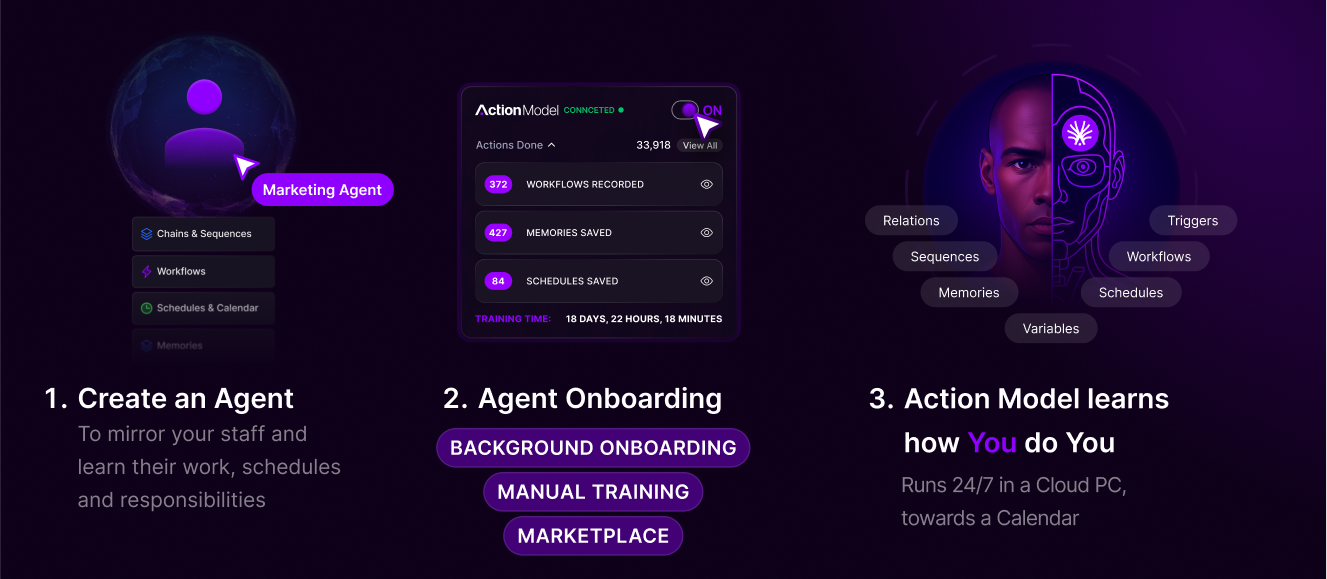
**Not a tool. A team member.** Give your agent its own accounts (Gmail, HubSpot, Slack, whatever you use). It logs in and works just like any human employee, with full platform access to any service with a screen.
**Transform departments with specialized AI workers**
Agents are the heart of Actionist, each one a digital employee with a specific role, personality, and expertise. Just like hiring for your team, you can create:
* **Marketing Agents**: Content creation, social media management, campaign execution
* **Sales Agents**: Lead qualification, CRM updates, follow-up sequences
* **HR Agents**: Resume screening, interview scheduling, onboarding
* **Operations Agents**: Data processing, report generation, system monitoring
Each agent can be customized with specific knowledge about your business, preferred communication style, and decision-making authority. They remember past interactions, learn from experience, and improve over time.
Learn how to create, customize, and deploy your digital workforce
### Workflows and Marketplace
**Build once, run forever**
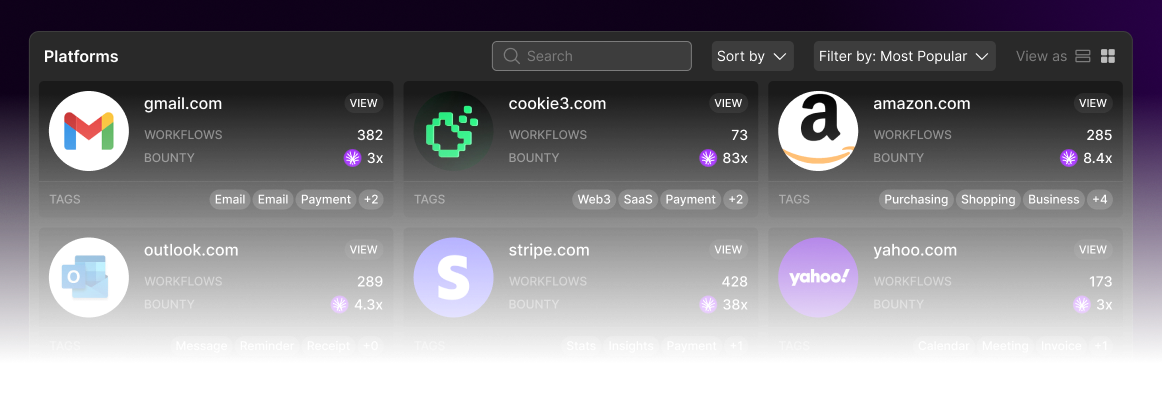
Workflows are the specific tasks your agents execute. Think of them as detailed instructions that can be:
* **Recorded**: Simply perform the task once while Actionist watches
* **Imported**: Use pre-built workflows from the marketplace
* **Customized**: Modify existing workflows for your specific needs
* **Chained**: Connect multiple workflows for complex processes
Examples include posting to social media, processing invoices, updating spreadsheets, sending emails, or any repetitive task you currently do manually. The LAM ensures these workflows adapt when websites change, so they never break.
Learn to create and customize workflows from scratch
Import 10,000+ pre-built workflows instantly
### Calendar: Smart Scheduling System
**Your AI workforce runs on schedule**
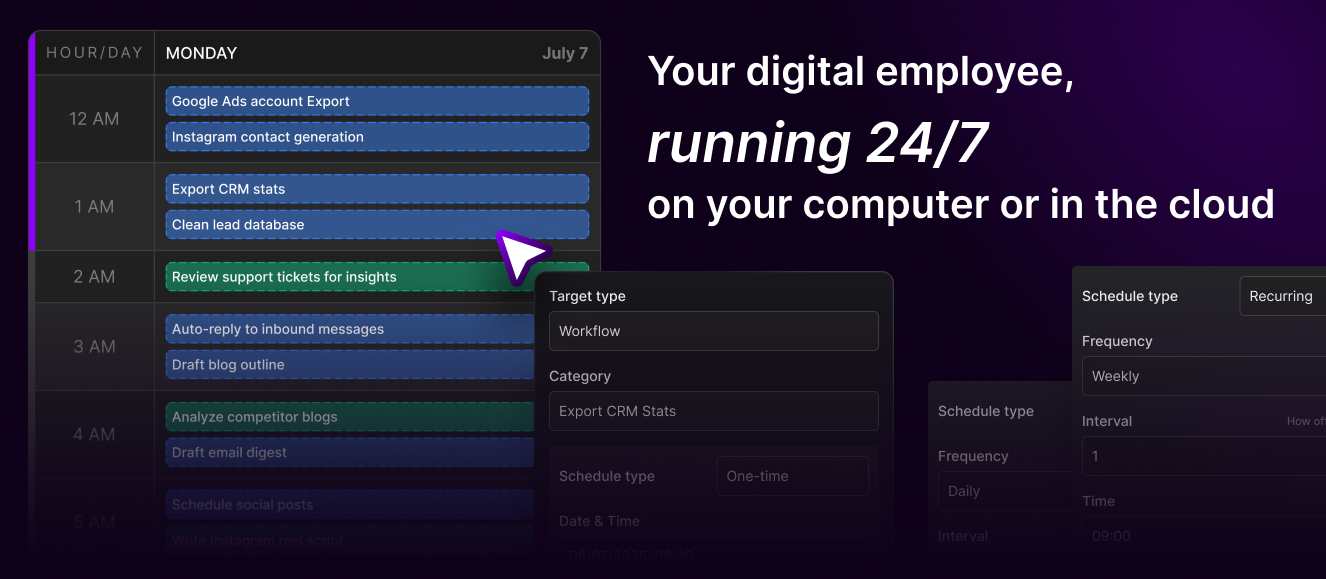
Just like human employees, your agents work on schedules you define:
* **Recurring Tasks**: Daily reports, weekly summaries, monthly audits
* **Time-Based Triggers**: Market open, business hours, deadline reminders
* **Coordinated Workflows**: Multiple agents working in sequence
* **Timezone Management**: Global operations across time zones
* **Resource Optimization**: Prevent overlap and manage workload
The calendar system ensures your automations run exactly when needed, whether that's every morning at 9 AM or every time a specific event occurs.
Master scheduling, triggers, and coordinated workflows
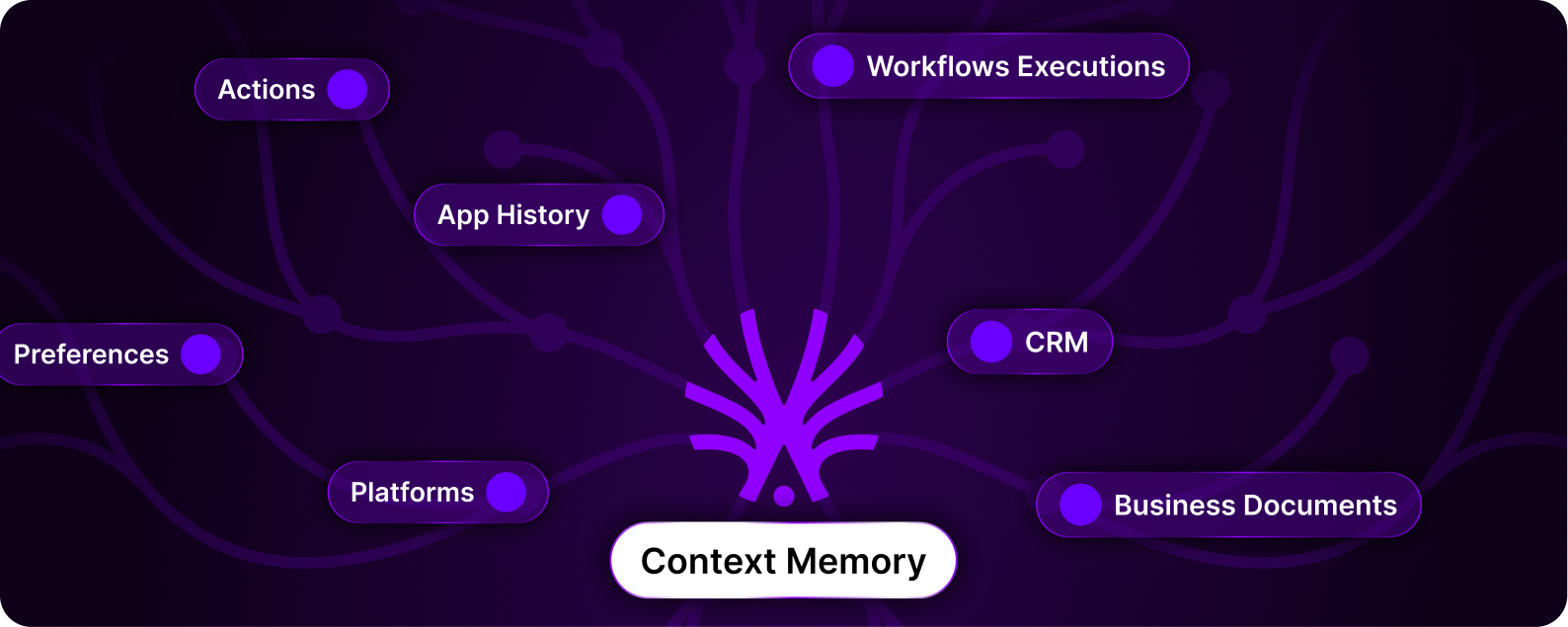
### Memory and Context
**Your agents never forget - and they learn from everything**
Memory and Context work together to make your agents truly intelligent:
**Persistent Memory:**
* **User Preferences**: Remember how you like things done
* **Platform Config**: Remember how you use your apps and platforms
* **Business Knowledge**: Custom information about your processes
* **Relationship Mapping**: Track connections between apps, platforms and data
**Intelligent Context from History:**
* **Cross-Platform Memory**: All platforms and executions connected
* **Automatic Context**: Relevant history injected into new tasks
* **Relationship Tracking**: Links people, platforms, and conversations across time
* **Smart Continuity**: Never duplicates outreach or loses context
**Example in Action:**
* January: Agent messages John Smith on LinkedIn
* March: Agent starts email campaign
* Result: Automatically knows John was already contacted, references prior conversation
This combination of persistent memory and historical context means agents get smarter over time, understanding your business and relationships better with each interaction.
Discover how agents learn, remember, and improve over time
### History: Audit Log
**Complete visibility and control over every automation**
Track, review, and audit everything your agents do:
* **Video Playback**: Watch full screen recordings of any execution
* **Action Logs**: Every click, type, and decision documented with timestamps
* **Error Tracking**: Identify exactly when and why automations fail
* **Performance Analytics**: Measure execution times and optimize workflows
* **Execution History**: Browse all past runs with filters and search
**Pro Tip**: Use History's video playback to debug workflows, train new team members, or demonstrate compliance to auditors. Every action is recorded and can be reviewed at any time.
Access video playback, action logs, and performance analytics
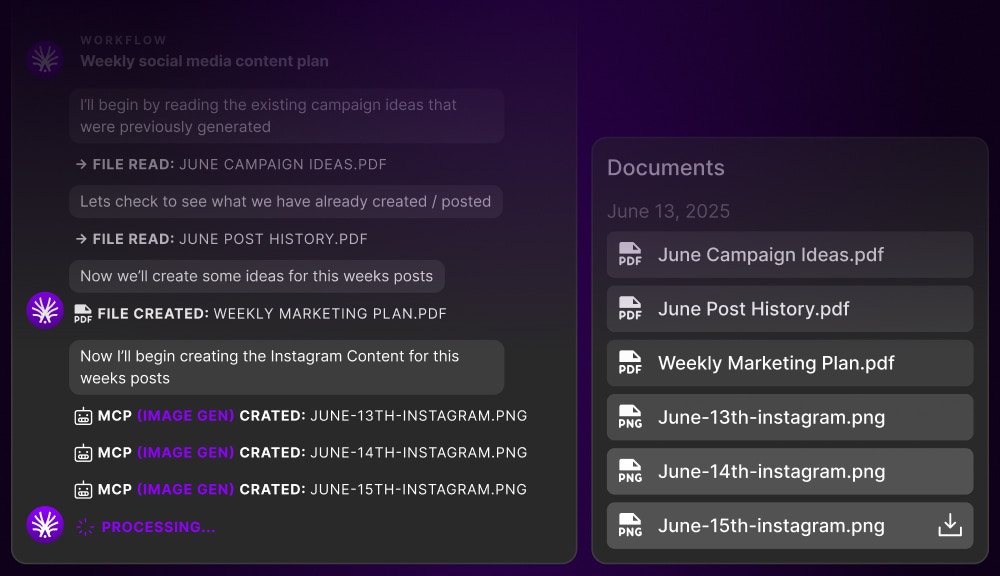
### 🔧 Tool Usage: Extend Your Capabilities
**Connect to anything, automate everything**
Extend Actionist's power with external tools:
* **API Integrations**: Connect to any service with an API
* **Custom Scripts**: Run Python, JavaScript, or bash scripts
* **Database Connections**: Read and write to your databases
* **File Operations**: Process documents, spreadsheets, and media
* **Webhook Triggers**: Respond to external events instantly
Tool usage transforms Actionist from a GUI automation tool into a complete automation platform that bridges visual interfaces with programmatic capabilities.
Connect APIs, scripts, databases, and custom functions
## How Actionist Works
### The Action Loop: Brain of Your Digital Employee
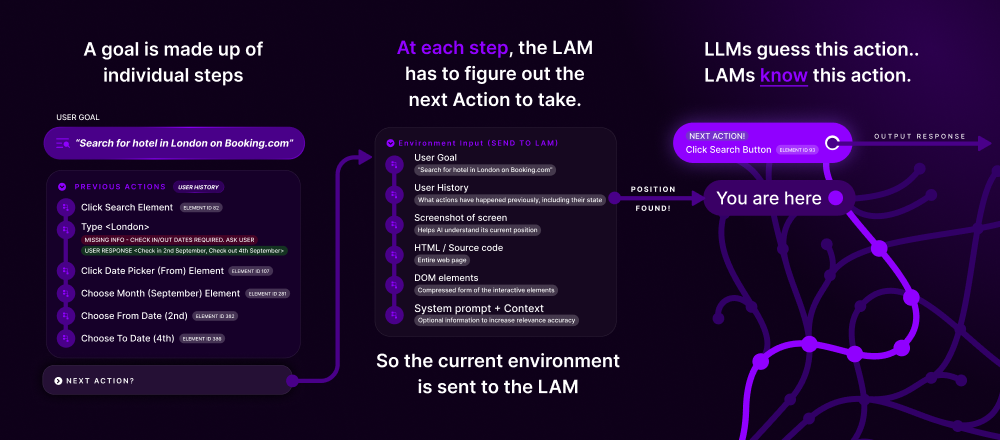
At the core of Actionist is the **Action Loop**, a continuous cycle of observation, decision, and action that mirrors human computer interaction. By looking at the screen, it can understand the context of what is happening, using the LAM (Large Action Model) to decide what Action to take next.
### How the Action Loop Works
The LAM captures the current screen state, understanding what's visible just like a human would
Using the Action Tree's millions of mapped journeys, it determines the optimal next action
Executes the precise GUI action, clicking, typing, scrolling, or navigating
Confirms the action's result and determines if the goal is achieved or more steps are needed
This Action Loop happens on repeat, taking one Action at a time, until either:
* The AI determines that the goal has been reached
* The time allotment has been reached (see [Agent Calendar](/actionist/agent-calendar-schedules))
* The workflow initiates a different workflow
### LAM API (Large Action Model)
The Actionist app uses the LAM API to utilize the Large Action Model and launch the Action Loop:
* Each of these Actions consumes the \$LAM token as fuel, which is the central utility of the ecosystem
* The \$LAM consumed during the Action Loop goes through a distribution and burning mechanism
* Read more here: [Token Utility](/tokenomics/token-utility)
### Cloud VPC: Your 24/7 Employees
**🚀 Supercharge with Cloud VPC**: While Actionist Desktop takes control of your computer, Cloud VPC gives each agent its own virtual machine in the cloud, enabling true 24/7 automation at scale.
**Your Local Machine**
* ✅ Free to start
* ✅ Full control & privacy
* ❌ Can't use computer during automation
* ❌ Limited to one agent at a time
* ❌ Stops when you close laptop
Best for: Personal use, testing, single workflows
**Dedicated Cloud Instances**
* ✅ Computer stays free for your use
* ✅ Run unlimited agents in parallel
* ✅ 24/7 operation without interruption
* ✅ Enterprise-grade reliability
* 💰 Pay per cloud instance
Best for: Businesses, continuous operations, teams
**Quick Example**: A marketing agency runs 15 Cloud VPC agents simultaneously, each managing different client social media accounts 24/7, while their team uses their computers normally for creative work.
Start with Desktop for testing, upgrade to Cloud when ready to scale
Each Cloud VPC agent gets a dedicated Mac or Windows instance and their own Calendar, working 24/7 for you
Need more capacity? Deploy additional Actionist Employees, each with its own accounts, schedules, and specializations. Scale from one agent to hundreds.
**Discover Cloud VPC Features**
Explore pricing, deployment options, management tools, and enterprise features for running your AI workforce in the cloud.
## Revolutionary Capabilities
### What Sets Actionist Apart
**Works with ANY website or application**
No APIs needed. No integrations required. If it has a GUI that humans can use, Actionist can automate it. This includes:
* Websites without APIs (99.9% of the internet)
* Desktop applications
* Legacy enterprise software
* Proprietary business tools
The LAM doesn't care about backend changes or missing documentation, it interacts with interfaces exactly as you would.
**Community-powered resilience**
When a website updates its interface:
* Traditional RPA tools break immediately
* Actionist adapts through the Action Tree
* Millions of users naturally retrain affected paths
* Your automations continue working seamlessly
This isn't just automation, it's **living automation** that evolves with the internet.
**Built for humans, not developers**
* Record your screen to create workflows
* Use natural language to describe tasks
* Import pre-built automations from the marketplace
* Let AI learn from observing your work patterns
If you can use a computer, you can use Actionist. Period.
## The Marketplace: Your Automation Superstore
### Instant Access to Thousands of Workflows
**The Game-Changing Difference**: Every workflow you use in Actionist can come from the community marketplace. And every workflow you create can earn you passive income forever.
Actionist isn't just a tool, it's connected to the **world's first community-owned automation marketplace**. This means:
**Deploy Instantly**
* Browse 10,000+ pre-built workflows
* One-click install to your Actionist
* No coding or configuration needed
* Workflows for every major platform
* Community-tested and improved
**Earn Forever**
* Record your workflow once
* Publish to the marketplace
* Earn \$LAM every time it's used
* Top creators earning \$47k+/month
* Your automation becomes passive income
### The Creator Economy Flywheel
Use Actionist to record any repetitive task you do
One-click publish your workflow for others to use
Every execution earns you \$LAM tokens automatically
Create more workflows, build agent bundles, become a top creator
**The Opportunity Window**: Early creators benefit from [Creator Epochs](/tokenomics/point-tiers-and-epochs#creator-epochs-permanent-marketplace-rewards) that lock in higher revenue percentages forever. The earlier you publish, the more you earn per execution—permanently.
Explore thousands of ready-to-use automations
Learn how to build your automation business
Discover high-reward ActionFi opportunities
## Real-World Impact
### Individual Users
Automate repetitive tasks and reclaim 10-20 hours per week for creative, strategic work
Create and sell workflows in the marketplace, earning passive income from your automations
### Businesses
Replace repetitive human labor with AI agents at a fraction of the cost
Deploy digital employees that work around the clock without breaks, vacations, or HR issues
## System Requirements & Availability
### Current Status
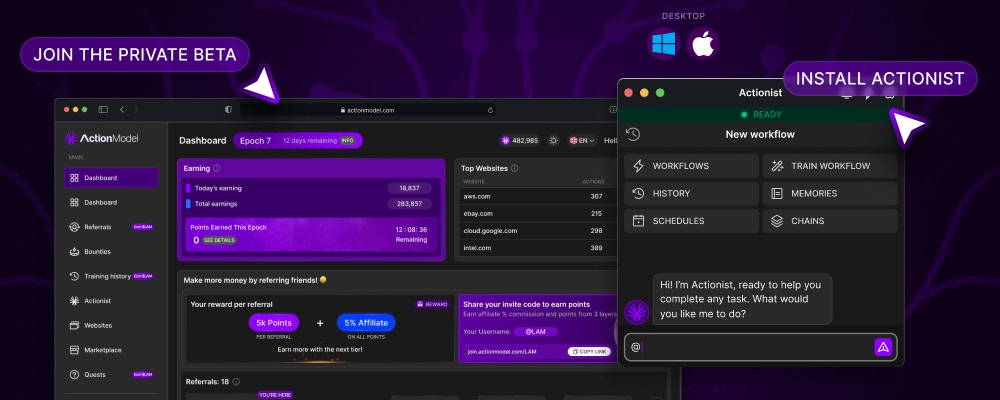
**Beta Access**: Actionist is currently in private beta. Contact the administration team for early access or join the waitlist through the Action Model dashboard.
### Platform Support
| Platform | Status | Requirements |
| ----------- | -------------- | -------------------------- |
| **macOS** | ✅ Available | macOS 10.15 or later |
| **Windows** | ✅ Available | Windows 10 or later |
| **Linux** | 🚧 Coming Soon | Ubuntu 20.04 or equivalent |
### System Settings & Permissions
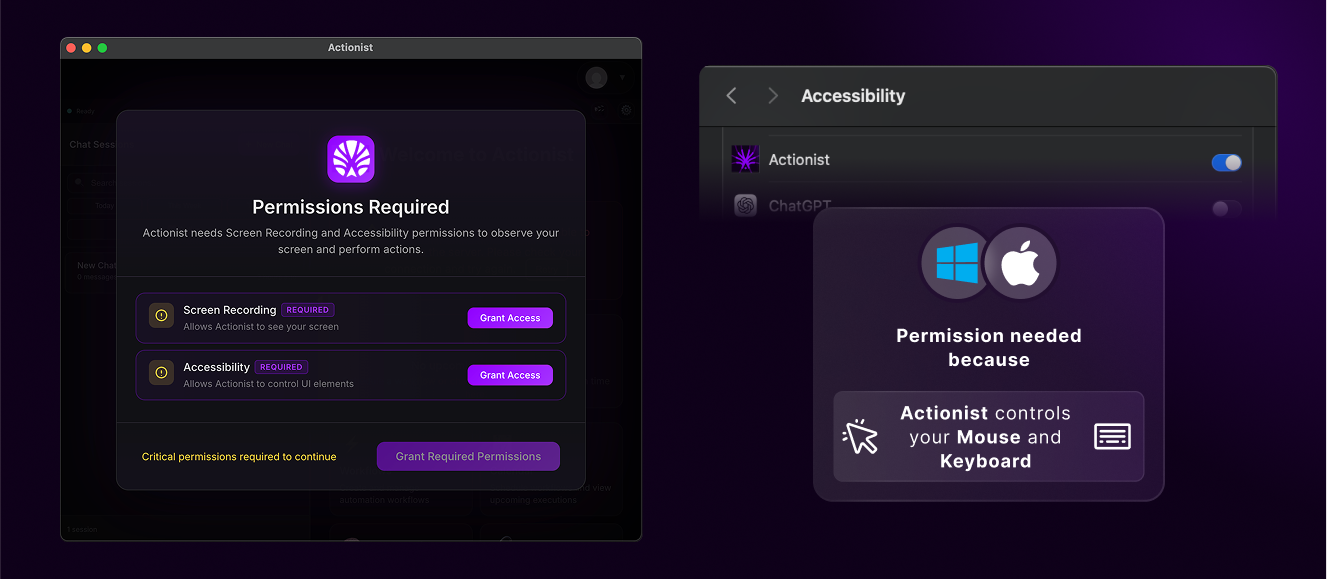
After logging in, users will be prompted to provide access to certain permissions:
* **Screen Recording**: To observe and understand interface states
* **Accessibility**: To control mouse and keyboard actions
* **Network Access**: To communicate with the LAM API
**Permission Setup**: The app will guide you through granting these permissions during initial setup. All permissions are essential for Actionist to function properly.
**Privacy First**: All screen analysis happens locally. Personal data is obfuscated before any information leaves your machine. You maintain full control over what Actionist can access.
## Getting Started
Join the private beta through the [Action Model Dashboard](https://train.actionmodel.com) or contact the team directly
Download and install the desktop application for your operating system
Allow necessary system permissions for screen recording and accessibility
Define an agent role (Marketing, Sales, HR) and personality
Click record and perform a task, Actionist will learn and replicate it
Set your workflow to run on a schedule or trigger it manually
## The Bigger Picture
### You're Not Just Automating, You're Revolutionizing
Actionist isn't just a tool; it's a weapon in the uprising against Big Tech's monopolization of AI automation. Every workflow you create, every task you automate, every token you earn is a step toward a future where:
* **AI automation benefits everyone**, not just tech giants
* **Workers own the tools** that automate their jobs
* **Value flows to contributors**, not corporate shareholders
* **The community controls** the technology's direction
**Join the Revolution**: By using Actionist, you're not just improving your productivity, you're helping build the world's first community-owned automation platform. You're part of the resistance.
## Next Steps
Watch real-world demos of Actionist automating complex tasks
Learn how to create powerful automations for any task
Understand why community ownership matters
***
**Actionist: Where AI stops talking and starts working.**
**Your computer. Your agent. Your ownership.**
**The revolution is automated.**
 **Transform departments with specialized AI workers**
Agents are the heart of Actionist, each one a digital employee with a specific role, personality, and expertise. Just like hiring for your team, you can create:
* **Marketing Agents**: Content creation, social media management, campaign execution
* **Sales Agents**: Lead qualification, CRM updates, follow-up sequences
* **HR Agents**: Resume screening, interview scheduling, onboarding
* **Operations Agents**: Data processing, report generation, system monitoring
Each agent can be customized with specific knowledge about your business, preferred communication style, and decision-making authority. They remember past interactions, learn from experience, and improve over time.
**Transform departments with specialized AI workers**
Agents are the heart of Actionist, each one a digital employee with a specific role, personality, and expertise. Just like hiring for your team, you can create:
* **Marketing Agents**: Content creation, social media management, campaign execution
* **Sales Agents**: Lead qualification, CRM updates, follow-up sequences
* **HR Agents**: Resume screening, interview scheduling, onboarding
* **Operations Agents**: Data processing, report generation, system monitoring
Each agent can be customized with specific knowledge about your business, preferred communication style, and decision-making authority. They remember past interactions, learn from experience, and improve over time.
 **Build once, run forever**
Workflows are the specific tasks your agents execute. Think of them as detailed instructions that can be:
* **Recorded**: Simply perform the task once while Actionist watches
* **Imported**: Use pre-built workflows from the marketplace
* **Customized**: Modify existing workflows for your specific needs
* **Chained**: Connect multiple workflows for complex processes
Examples include posting to social media, processing invoices, updating spreadsheets, sending emails, or any repetitive task you currently do manually. The LAM ensures these workflows adapt when websites change, so they never break.
**Build once, run forever**
Workflows are the specific tasks your agents execute. Think of them as detailed instructions that can be:
* **Recorded**: Simply perform the task once while Actionist watches
* **Imported**: Use pre-built workflows from the marketplace
* **Customized**: Modify existing workflows for your specific needs
* **Chained**: Connect multiple workflows for complex processes
Examples include posting to social media, processing invoices, updating spreadsheets, sending emails, or any repetitive task you currently do manually. The LAM ensures these workflows adapt when websites change, so they never break.
 **Your AI workforce runs on schedule**
Just like human employees, your agents work on schedules you define:
* **Recurring Tasks**: Daily reports, weekly summaries, monthly audits
* **Time-Based Triggers**: Market open, business hours, deadline reminders
* **Coordinated Workflows**: Multiple agents working in sequence
* **Timezone Management**: Global operations across time zones
* **Resource Optimization**: Prevent overlap and manage workload
The calendar system ensures your automations run exactly when needed, whether that's every morning at 9 AM or every time a specific event occurs.
**Your AI workforce runs on schedule**
Just like human employees, your agents work on schedules you define:
* **Recurring Tasks**: Daily reports, weekly summaries, monthly audits
* **Time-Based Triggers**: Market open, business hours, deadline reminders
* **Coordinated Workflows**: Multiple agents working in sequence
* **Timezone Management**: Global operations across time zones
* **Resource Optimization**: Prevent overlap and manage workload
The calendar system ensures your automations run exactly when needed, whether that's every morning at 9 AM or every time a specific event occurs.
 **Your agents never forget - and they learn from everything**
Memory and Context work together to make your agents truly intelligent:
**Persistent Memory:**
* **User Preferences**: Remember how you like things done
* **Platform Config**: Remember how you use your apps and platforms
* **Business Knowledge**: Custom information about your processes
* **Relationship Mapping**: Track connections between apps, platforms and data
**Intelligent Context from History:**
* **Cross-Platform Memory**: All platforms and executions connected
* **Automatic Context**: Relevant history injected into new tasks
* **Relationship Tracking**: Links people, platforms, and conversations across time
* **Smart Continuity**: Never duplicates outreach or loses context
**Your agents never forget - and they learn from everything**
Memory and Context work together to make your agents truly intelligent:
**Persistent Memory:**
* **User Preferences**: Remember how you like things done
* **Platform Config**: Remember how you use your apps and platforms
* **Business Knowledge**: Custom information about your processes
* **Relationship Mapping**: Track connections between apps, platforms and data
**Intelligent Context from History:**
* **Cross-Platform Memory**: All platforms and executions connected
* **Automatic Context**: Relevant history injected into new tasks
* **Relationship Tracking**: Links people, platforms, and conversations across time
* **Smart Continuity**: Never duplicates outreach or loses context
 **Complete visibility and control over every automation**
Track, review, and audit everything your agents do:
* **Video Playback**: Watch full screen recordings of any execution
* **Action Logs**: Every click, type, and decision documented with timestamps
* **Error Tracking**: Identify exactly when and why automations fail
* **Performance Analytics**: Measure execution times and optimize workflows
* **Execution History**: Browse all past runs with filters and search
**Complete visibility and control over every automation**
Track, review, and audit everything your agents do:
* **Video Playback**: Watch full screen recordings of any execution
* **Action Logs**: Every click, type, and decision documented with timestamps
* **Error Tracking**: Identify exactly when and why automations fail
* **Performance Analytics**: Measure execution times and optimize workflows
* **Execution History**: Browse all past runs with filters and search
 **Connect to anything, automate everything**
Extend Actionist's power with external tools:
* **API Integrations**: Connect to any service with an API
* **Custom Scripts**: Run Python, JavaScript, or bash scripts
* **Database Connections**: Read and write to your databases
* **File Operations**: Process documents, spreadsheets, and media
* **Webhook Triggers**: Respond to external events instantly
Tool usage transforms Actionist from a GUI automation tool into a complete automation platform that bridges visual interfaces with programmatic capabilities.
**Connect to anything, automate everything**
Extend Actionist's power with external tools:
* **API Integrations**: Connect to any service with an API
* **Custom Scripts**: Run Python, JavaScript, or bash scripts
* **Database Connections**: Read and write to your databases
* **File Operations**: Process documents, spreadsheets, and media
* **Webhook Triggers**: Respond to external events instantly
Tool usage transforms Actionist from a GUI automation tool into a complete automation platform that bridges visual interfaces with programmatic capabilities.
 ### LAM API (Large Action Model)
The Actionist app uses the LAM API to utilize the Large Action Model and launch the Action Loop:
* Each of these Actions consumes the \$LAM token as fuel, which is the central utility of the ecosystem
* The \$LAM consumed during the Action Loop goes through a distribution and burning mechanism
* Read more here: [Token Utility](/tokenomics/token-utility)
### Cloud VPC: Your 24/7 Employees
### LAM API (Large Action Model)
The Actionist app uses the LAM API to utilize the Large Action Model and launch the Action Loop:
* Each of these Actions consumes the \$LAM token as fuel, which is the central utility of the ecosystem
* The \$LAM consumed during the Action Loop goes through a distribution and burning mechanism
* Read more here: [Token Utility](/tokenomics/token-utility)
### Cloud VPC: Your 24/7 Employees
 ### Individual Users