> ## Documentation Index
> Fetch the complete documentation index at: https://docs.actionmodel.com/llms.txt
> Use this file to discover all available pages before exploring further.
# Agent History
> Complete audit trails of every action your AI workforce takes. Watch replays, debug workflows, analyze performance, and maintain compliance with comprehensive execution history.
 ## Every Action, Recorded. Every Decision, Transparent.
Agent History transforms your AI workforce from a black box into a **glass box operation**. Every click, every decision, every data point is captured, searchable, and replayable—giving you unprecedented visibility into your automation empire.
**The Trust Factor**: Unlike traditional automation that runs invisibly, Agent History provides complete transparency and accountability for every automated action, building trust with stakeholders and ensuring compliance.
## Visual History Overview
## Core History Features
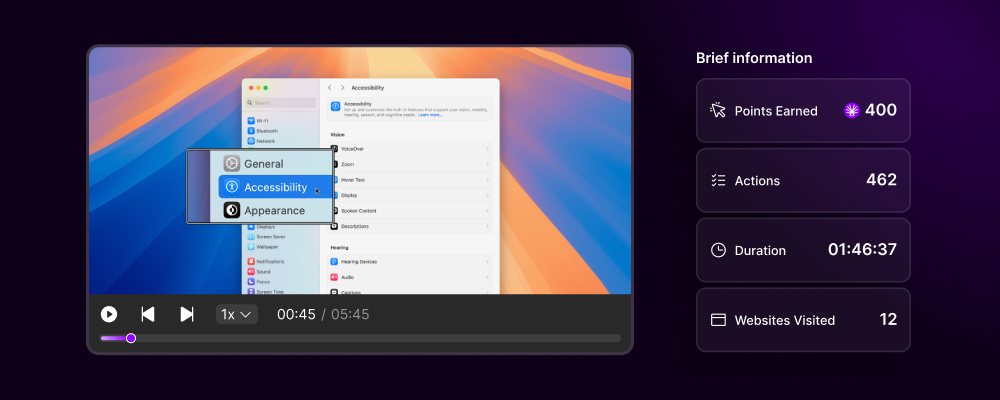
Watch exactly what your agent did with full video replay
Detailed timestamped log of every action and decision
Execution times, success rates, and optimization insights
Identify exactly where and why workflows failed
Maintain complete audit trails for regulatory requirements
Rewind to any point in execution history
## History Dashboard Interface
### Real-Time Monitoring & Historical Analysis
**Watch Your Agents in Real-Time**
The live view shows currently executing workflows with:
* Real-time screen streaming
* Live action feed
* Current variable states
* Performance metrics
* Resource utilization
* Active decision points
**Features:**
* Pause/resume execution
* Manual intervention capability
* Live debugging tools
* Performance profiling
* Alert notifications
**Interactive Execution Timeline**
Visual timeline showing:
* Start and end points
* Action sequences
* Decision branches taken
* Wait times and delays
* Error occurrences
* Human confirmations
**Navigation:**
* Click any point to jump to that moment
* Zoom in/out for detail levels
* Filter by action types
* Search specific events
* Export timeline data
**Multi-Agent Monitoring**
Monitor multiple agents simultaneously:
* 2x2, 3x3, or 4x4 grid layouts
* Synchronized playback
* Compare execution patterns
* Identify bottlenecks
* Team performance overview
**Perfect for:**
* Parallel workflow monitoring
* Performance comparison
* Training verification
* Quality assurance
**Deep Performance Insights**
Comprehensive analytics dashboard:
* Success/failure rates
* Average execution times
* Resource consumption
* Cost per automation
* ROI calculations
* Trend analysis
**Metrics Include:**
* Actions per minute
* Error frequency
* Human intervention rate
* Platform-specific performance
* Workflow optimization opportunities
## Search & Filter Capabilities
### Find Any Action, Instantly
**Search Across All History:**
Search by:
* **Text Content**: Find where specific text was typed or seen
* **URLs**: Locate all interactions with specific websites
* **Dates/Times**: Filter by execution timeframes
* **Agents**: Search specific agent histories
* **Workflows**: Find all executions of particular workflows
* **Status**: Filter by success, failure, or partial completion
* **Variables**: Search for specific variable values used
**Search Operators:**
* AND/OR/NOT logic
* Wildcards and regex
* Date ranges
* Numeric comparisons
**Pre-built Filter Sets:**
Quick filters for common searches:
* Failed executions in last 24 hours
* Workflows requiring human confirmation
* Slowest performing workflows
* Most error-prone processes
* High-value transactions
* Compliance-required audits
**Custom Filter Builder:**
* Save frequently used filters
* Share filters with team
* Schedule filter reports
* Set up filter alerts
**AI-Powered Pattern Detection:**
The system automatically identifies:
* Recurring errors
* Performance degradation patterns
* Unusual execution paths
* Optimization opportunities
* Security anomalies
* Compliance violations
**Insights Generated:**
* "This workflow fails 40% more on Mondays"
* "Loading time increased 25% since last update"
* "This decision branch is never taken"
## Every Action, Recorded. Every Decision, Transparent.
Agent History transforms your AI workforce from a black box into a **glass box operation**. Every click, every decision, every data point is captured, searchable, and replayable—giving you unprecedented visibility into your automation empire.
**The Trust Factor**: Unlike traditional automation that runs invisibly, Agent History provides complete transparency and accountability for every automated action, building trust with stakeholders and ensuring compliance.
## Visual History Overview
## Core History Features
Watch exactly what your agent did with full video replay
Detailed timestamped log of every action and decision
Execution times, success rates, and optimization insights
Identify exactly where and why workflows failed
Maintain complete audit trails for regulatory requirements
Rewind to any point in execution history
## History Dashboard Interface
### Real-Time Monitoring & Historical Analysis
**Watch Your Agents in Real-Time**
The live view shows currently executing workflows with:
* Real-time screen streaming
* Live action feed
* Current variable states
* Performance metrics
* Resource utilization
* Active decision points
**Features:**
* Pause/resume execution
* Manual intervention capability
* Live debugging tools
* Performance profiling
* Alert notifications
**Interactive Execution Timeline**
Visual timeline showing:
* Start and end points
* Action sequences
* Decision branches taken
* Wait times and delays
* Error occurrences
* Human confirmations
**Navigation:**
* Click any point to jump to that moment
* Zoom in/out for detail levels
* Filter by action types
* Search specific events
* Export timeline data
**Multi-Agent Monitoring**
Monitor multiple agents simultaneously:
* 2x2, 3x3, or 4x4 grid layouts
* Synchronized playback
* Compare execution patterns
* Identify bottlenecks
* Team performance overview
**Perfect for:**
* Parallel workflow monitoring
* Performance comparison
* Training verification
* Quality assurance
**Deep Performance Insights**
Comprehensive analytics dashboard:
* Success/failure rates
* Average execution times
* Resource consumption
* Cost per automation
* ROI calculations
* Trend analysis
**Metrics Include:**
* Actions per minute
* Error frequency
* Human intervention rate
* Platform-specific performance
* Workflow optimization opportunities
## Search & Filter Capabilities
### Find Any Action, Instantly
**Search Across All History:**
Search by:
* **Text Content**: Find where specific text was typed or seen
* **URLs**: Locate all interactions with specific websites
* **Dates/Times**: Filter by execution timeframes
* **Agents**: Search specific agent histories
* **Workflows**: Find all executions of particular workflows
* **Status**: Filter by success, failure, or partial completion
* **Variables**: Search for specific variable values used
**Search Operators:**
* AND/OR/NOT logic
* Wildcards and regex
* Date ranges
* Numeric comparisons
**Pre-built Filter Sets:**
Quick filters for common searches:
* Failed executions in last 24 hours
* Workflows requiring human confirmation
* Slowest performing workflows
* Most error-prone processes
* High-value transactions
* Compliance-required audits
**Custom Filter Builder:**
* Save frequently used filters
* Share filters with team
* Schedule filter reports
* Set up filter alerts
**AI-Powered Pattern Detection:**
The system automatically identifies:
* Recurring errors
* Performance degradation patterns
* Unusual execution paths
* Optimization opportunities
* Security anomalies
* Compliance violations
**Insights Generated:**
* "This workflow fails 40% more on Mondays"
* "Loading time increased 25% since last update"
* "This decision branch is never taken"
 ## Playback Features
### More Than Just Video
**Full Screen Recording Playback:**
* HD quality recording
* Variable playback speed (0.5x - 4x)
* Frame-by-frame stepping
* Screenshot capture at any point
* Annotation tools for review
**Synchronized Action Log:**
* Click actions with coordinates
* Keyboard inputs (sanitized)
* Wait times and delays
* API calls and responses
* Decision logic executed
**Track Data Flow:**
* Variable values at each step
* Data transformations
* Memory access logs
* External data fetches
* Calculation results
**Developer-Friendly Tools:**
* Network traffic logs
* Console output
* Error stack traces
* Performance profiling
* Resource monitoring
## Performance Analytics
### Actionable Insights from History
**Continuous Improvement**: Every workflow execution contributes to performance analytics, helping identify optimization opportunities automatically.
| Metric | Description | Use Case |
| ---------------------- | --------------------------- | ------------------------------ |
| **Success Rate** | % of successful completions | Identify problematic workflows |
| **Average Duration** | Mean execution time | Spot performance degradation |
| **Error Frequency** | Errors per 100 runs | Prioritize debugging efforts |
| **Cost per Run** | Computed resource cost | ROI calculation |
| **Human Intervention** | % requiring confirmation | Automation completeness |
**Performance Over Time:**
Track how your automations evolve:
* Daily/weekly/monthly trends
* Before/after workflow updates
* Seasonal patterns
* Peak usage periods
* Degradation detection
**Predictive Analytics:**
* Forecast failure likelihood
* Predict maintenance needs
* Estimate completion times
* Resource requirement planning
**Benchmark Your Automation:**
Compare:
* Different workflow versions
* Multiple agents on same task
* Desktop vs Cloud VPC execution
* Various input parameters
* Time period comparisons
**Optimization Recommendations:**
* "Version 2.3 is 40% faster"
* "Agent B completes with 95% success vs 80%"
* "Cloud execution saves 3 minutes"
## Compliance & Audit
### Enterprise-Grade Audit Trails
**Meet Any Standard:**
* GDPR data processing logs
* SOC 2 audit trails
* HIPAA activity monitoring
* Financial regulation compliance
* Custom compliance frameworks
**Features:**
* Immutable audit logs
* Cryptographic verification
* Timestamp authentication
* User attribution
* Change tracking
**Detect & Prevent Issues:**
* Unusual access patterns
* Unauthorized action attempts
* Data exfiltration detection
* Privilege escalation alerts
* Anomaly detection
**Response Capabilities:**
* Instant alerts
* Automatic workflow suspension
* Incident recording
* Forensic analysis tools
## Data Management
### Storage & Retention Options
**Flexible Storage Options:**
| Tier | Retention | Storage | Access Speed | Cost |
| ----------- | --------- | ------- | ------------ | ---------- |
| **Hot** | 7 days | SSD | Instant | Included |
| **Warm** | 30 days | HDD | \<1 min | Included |
| **Cold** | 90 days | Cloud | \<5 min | +\$0.05/GB |
| **Archive** | Unlimited | Glacier | \<12 hrs | +\$0.01/GB |
**Multiple Export Formats:**
Export history data for external analysis:
* **CSV**: Structured action logs
* **JSON**: Complete execution data
* **MP4**: Video recordings
* **PDF**: Compliance reports
* **API**: Programmatic access
**Bulk Export Features:**
* Date range selection
* Workflow filtering
* Compression options
* Scheduled exports
* Direct cloud storage integration
**Data Protection:**
* Automatic PII redaction
* Password masking
* Credit card hiding
* SSN obfuscation
* Custom redaction rules
**Access Controls:**
* Role-based viewing permissions
* Time-limited access tokens
* IP restrictions
* Audit log of history access
* Data encryption at rest
## Playback Features
### More Than Just Video
**Full Screen Recording Playback:**
* HD quality recording
* Variable playback speed (0.5x - 4x)
* Frame-by-frame stepping
* Screenshot capture at any point
* Annotation tools for review
**Synchronized Action Log:**
* Click actions with coordinates
* Keyboard inputs (sanitized)
* Wait times and delays
* API calls and responses
* Decision logic executed
**Track Data Flow:**
* Variable values at each step
* Data transformations
* Memory access logs
* External data fetches
* Calculation results
**Developer-Friendly Tools:**
* Network traffic logs
* Console output
* Error stack traces
* Performance profiling
* Resource monitoring
## Performance Analytics
### Actionable Insights from History
**Continuous Improvement**: Every workflow execution contributes to performance analytics, helping identify optimization opportunities automatically.
| Metric | Description | Use Case |
| ---------------------- | --------------------------- | ------------------------------ |
| **Success Rate** | % of successful completions | Identify problematic workflows |
| **Average Duration** | Mean execution time | Spot performance degradation |
| **Error Frequency** | Errors per 100 runs | Prioritize debugging efforts |
| **Cost per Run** | Computed resource cost | ROI calculation |
| **Human Intervention** | % requiring confirmation | Automation completeness |
**Performance Over Time:**
Track how your automations evolve:
* Daily/weekly/monthly trends
* Before/after workflow updates
* Seasonal patterns
* Peak usage periods
* Degradation detection
**Predictive Analytics:**
* Forecast failure likelihood
* Predict maintenance needs
* Estimate completion times
* Resource requirement planning
**Benchmark Your Automation:**
Compare:
* Different workflow versions
* Multiple agents on same task
* Desktop vs Cloud VPC execution
* Various input parameters
* Time period comparisons
**Optimization Recommendations:**
* "Version 2.3 is 40% faster"
* "Agent B completes with 95% success vs 80%"
* "Cloud execution saves 3 minutes"
## Compliance & Audit
### Enterprise-Grade Audit Trails
**Meet Any Standard:**
* GDPR data processing logs
* SOC 2 audit trails
* HIPAA activity monitoring
* Financial regulation compliance
* Custom compliance frameworks
**Features:**
* Immutable audit logs
* Cryptographic verification
* Timestamp authentication
* User attribution
* Change tracking
**Detect & Prevent Issues:**
* Unusual access patterns
* Unauthorized action attempts
* Data exfiltration detection
* Privilege escalation alerts
* Anomaly detection
**Response Capabilities:**
* Instant alerts
* Automatic workflow suspension
* Incident recording
* Forensic analysis tools
## Data Management
### Storage & Retention Options
**Flexible Storage Options:**
| Tier | Retention | Storage | Access Speed | Cost |
| ----------- | --------- | ------- | ------------ | ---------- |
| **Hot** | 7 days | SSD | Instant | Included |
| **Warm** | 30 days | HDD | \<1 min | Included |
| **Cold** | 90 days | Cloud | \<5 min | +\$0.05/GB |
| **Archive** | Unlimited | Glacier | \<12 hrs | +\$0.01/GB |
**Multiple Export Formats:**
Export history data for external analysis:
* **CSV**: Structured action logs
* **JSON**: Complete execution data
* **MP4**: Video recordings
* **PDF**: Compliance reports
* **API**: Programmatic access
**Bulk Export Features:**
* Date range selection
* Workflow filtering
* Compression options
* Scheduled exports
* Direct cloud storage integration
**Data Protection:**
* Automatic PII redaction
* Password masking
* Credit card hiding
* SSN obfuscation
* Custom redaction rules
**Access Controls:**
* Role-based viewing permissions
* Time-limited access tokens
* IP restrictions
* Audit log of history access
* Data encryption at rest
 ## Use Cases
### Real-World Applications
**Scenario**: E-commerce order processing
**How History Helps:**
* Review failed order workflows
* Identify why certain products cause errors
* Verify correct pricing applied
* Ensure shipping calculations accurate
* Validate inventory updates
**Result**: 99.9% order accuracy
**Scenario**: New employee onboarding
**How History Helps:**
* Show new hires how workflows execute
* Use recordings for training materials
* Demonstrate best practices
* Review common error scenarios
* Create standard operating procedures
**Result**: 70% faster onboarding
**Scenario**: Investigating customer complaints
**How History Helps:**
* Find exact interaction with customer data
* Verify actions taken on account
* Identify if automation caused issue
* Provide evidence of correct processing
* Generate audit reports for customer
**Result**: 5-minute issue resolution
**Scenario**: Workflow optimization
**How History Helps:**
* Identify slowest steps
* Find unnecessary actions
* Detect redundant workflows
* Analyze failure patterns
* Test optimization impact
**Result**: 40% performance improvement
## Alerts & Notifications
### Stay Informed About Important Events
Instant notification when workflows fail or encounter errors
Warnings when execution time exceeds thresholds
Notifications for audit-required events or violations
Confirmations for critical workflow completions
AI-detected unusual patterns or behaviors
User-defined alert conditions
## Advanced Features
### Enterprise Power Tools
**Professional Debugging Suite:**
* Set breakpoints in workflows
* Step through execution
* Inspect variable states
* Modify values on-the-fly
* Test alternative paths
**Time-Travel Debugging:**
* Replay from any point
* Change parameters
* Test "what-if" scenarios
* Compare outcomes
**Collaborative Review Tools:**
* Share playback sessions
* Add timestamped comments
* Tag team members
* Create review tasks
* Approval workflows
**Knowledge Sharing:**
* Create clips from history
* Build training libraries
* Share best practices
* Document edge cases
**Programmatic History Access:**
```python theme={null}
# Fetch execution history
history = actionist.get_history(
workflow_id="sales_pipeline",
date_range="last_7_days",
status="all"
)
# Analyze performance
metrics = history.calculate_metrics()
print(f"Success rate: {metrics.success_rate}%")
print(f"Avg duration: {metrics.avg_duration}s")
```
**Available Endpoints:**
* GET /history/executions
* GET /history/playback/id
* GET /history/analytics
* POST /history/export
* DELETE /history/purge
## History Analytics Dashboard
### Key Performance Indicators
| KPI | Current | Target | Status |
| ------------------------ | ---------------- | ------ | ------ |
| **History Coverage** | 100% | 100% | ✅ |
| **Playback Available** | 98.5% | >95% | ✅ |
| **Search Speed** | \<500ms | \<1s | ✅ |
| **Storage Efficiency** | 10:1 compression | 8:1 | ✅ |
| **Retention Compliance** | 100% | 100% | ✅ |
## Use Cases
### Real-World Applications
**Scenario**: E-commerce order processing
**How History Helps:**
* Review failed order workflows
* Identify why certain products cause errors
* Verify correct pricing applied
* Ensure shipping calculations accurate
* Validate inventory updates
**Result**: 99.9% order accuracy
**Scenario**: New employee onboarding
**How History Helps:**
* Show new hires how workflows execute
* Use recordings for training materials
* Demonstrate best practices
* Review common error scenarios
* Create standard operating procedures
**Result**: 70% faster onboarding
**Scenario**: Investigating customer complaints
**How History Helps:**
* Find exact interaction with customer data
* Verify actions taken on account
* Identify if automation caused issue
* Provide evidence of correct processing
* Generate audit reports for customer
**Result**: 5-minute issue resolution
**Scenario**: Workflow optimization
**How History Helps:**
* Identify slowest steps
* Find unnecessary actions
* Detect redundant workflows
* Analyze failure patterns
* Test optimization impact
**Result**: 40% performance improvement
## Alerts & Notifications
### Stay Informed About Important Events
Instant notification when workflows fail or encounter errors
Warnings when execution time exceeds thresholds
Notifications for audit-required events or violations
Confirmations for critical workflow completions
AI-detected unusual patterns or behaviors
User-defined alert conditions
## Advanced Features
### Enterprise Power Tools
**Professional Debugging Suite:**
* Set breakpoints in workflows
* Step through execution
* Inspect variable states
* Modify values on-the-fly
* Test alternative paths
**Time-Travel Debugging:**
* Replay from any point
* Change parameters
* Test "what-if" scenarios
* Compare outcomes
**Collaborative Review Tools:**
* Share playback sessions
* Add timestamped comments
* Tag team members
* Create review tasks
* Approval workflows
**Knowledge Sharing:**
* Create clips from history
* Build training libraries
* Share best practices
* Document edge cases
**Programmatic History Access:**
```python theme={null}
# Fetch execution history
history = actionist.get_history(
workflow_id="sales_pipeline",
date_range="last_7_days",
status="all"
)
# Analyze performance
metrics = history.calculate_metrics()
print(f"Success rate: {metrics.success_rate}%")
print(f"Avg duration: {metrics.avg_duration}s")
```
**Available Endpoints:**
* GET /history/executions
* GET /history/playback/id
* GET /history/analytics
* POST /history/export
* DELETE /history/purge
## History Analytics Dashboard
### Key Performance Indicators
| KPI | Current | Target | Status |
| ------------------------ | ---------------- | ------ | ------ |
| **History Coverage** | 100% | 100% | ✅ |
| **Playback Available** | 98.5% | >95% | ✅ |
| **Search Speed** | \<500ms | \<1s | ✅ |
| **Storage Efficiency** | 10:1 compression | 8:1 | ✅ |
| **Retention Compliance** | 100% | 100% | ✅ |
 ## Getting Started with History
History recording is enabled by default for all workflows
Click the History tab in your Actionist dashboard
Use search to find specific executions or browse recent runs
Review analytics to identify optimization opportunities
Generate audit reports as needed
**Storage Included**: All Actionist plans include 30 days of history storage. Extend retention with affordable archive options for long-term compliance needs.
See history in action
Optimize your workflows
Integrate with your tools
***
**Agent History: Complete transparency. Total accountability. Continuous improvement.**
**Every action matters. Every decision counts. Everything is recorded.**
## Getting Started with History
History recording is enabled by default for all workflows
Click the History tab in your Actionist dashboard
Use search to find specific executions or browse recent runs
Review analytics to identify optimization opportunities
Generate audit reports as needed
**Storage Included**: All Actionist plans include 30 days of history storage. Extend retention with affordable archive options for long-term compliance needs.
See history in action
Optimize your workflows
Integrate with your tools
***
**Agent History: Complete transparency. Total accountability. Continuous improvement.**
**Every action matters. Every decision counts. Everything is recorded.**