> ## Documentation Index
> Fetch the complete documentation index at: https://docs.actionmodel.com/llms.txt
> Use this file to discover all available pages before exploring further.
# Agent Memory
> Give your AI agents a second brain. Build persistent knowledge bases that make automations smarter, more personalized, and context-aware across all platforms.
## The Second Brain for Your Digital Workforce
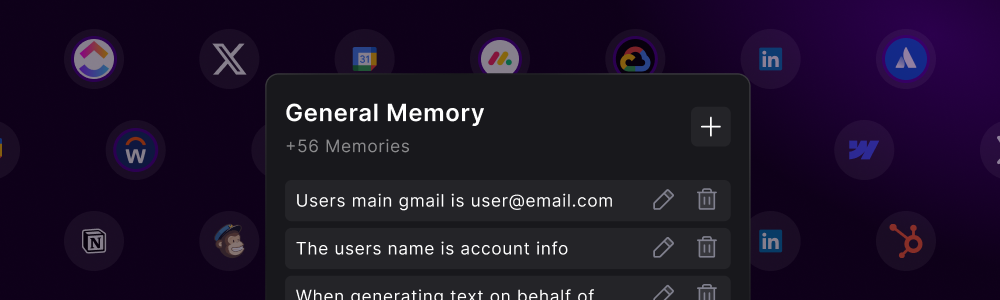
**Intelligence without memory is just reaction.** The Memory System gives your Agent persistent, contextual knowledge that compounds over time. The more your Agent works, the smarter it gets.
Agent Memory transforms your automations from simple task executors into **intelligent, context-aware digital employees** that remember everything about your business, preferences, and relationships between platforms.
Think of it as the difference between a temp worker who needs instructions for everything and a seasoned employee who knows your business inside out.
**The Game Changer**: Without memory, agents start from zero every time. With memory, they accumulate knowledge, learn preferences, and become exponentially more valuable over time—just like real employees.
## Understanding Agent Memory
## Memory Architecture
### The Six Pillars of Agent Intelligence
How you like to use each platform, your settings, and personal configurations
How different platforms work, their quirks, and navigation patterns
How platforms connect to each other and data flows between them
Your company information, products, services, and strategic goals
Your communication tone, writing style, and decision patterns
Policies, procedures, compliance requirements, and best practices
## Memory Categories
### Structured Knowledge Organization
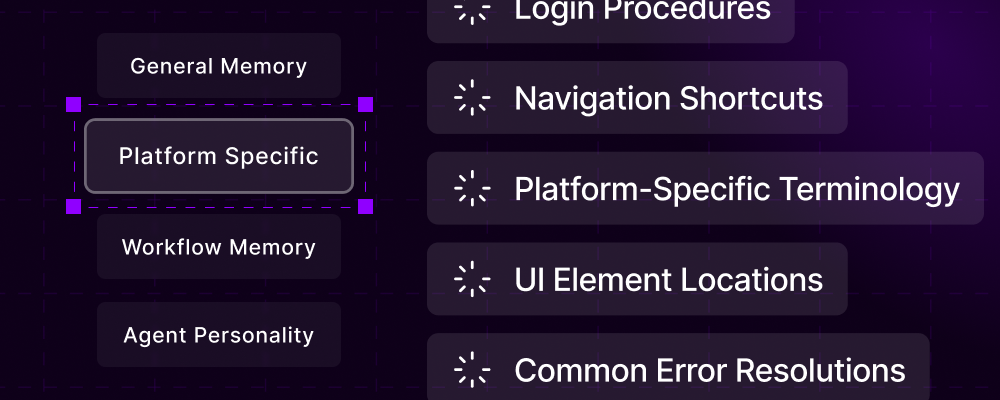
**Universal Knowledge Base**
The default memory section that applies across all workflows:
* Company information
* Brand guidelines
* Common procedures
* Default preferences
* Universal shortcuts
* Cross-platform rules
**Examples:**
* "Our company fiscal year ends in March"
* "Always use British spelling for UK clients"
* "CEO prefers bullet points over paragraphs"
* "All reports should include an executive summary"
**Domain-Targeted Intelligence**
Memories tied to specific websites or applications:
* Login procedures
* Navigation shortcuts
* Platform-specific terminology
* UI element locations
* Common error resolutions
* Workflow optimizations
**Examples:**
* "Gmail: Compose button is in top left"
* "Salesforce: Custom fields are under Advanced"
* "LinkedIn: Best posting time is 9 AM EST"
* "Stripe: Test mode toggle is in top right"
**Task-Specific Knowledge**
Memories attached to individual workflows:
* Step-specific instructions
* Variable handling rules
* Error recovery procedures
* Success criteria
* Optimization notes
* Historical learnings
**Examples:**
* "Invoice Processing: Check for duplicates first"
* "Lead Generation: Skip competitors' employees"
* "Report Generation: Include last 30 days only"
**Behavioral Patterns**
Defines how your agent behaves and communicates:
* Communication style
* Decision-making approach
* Priority handling
* Escalation triggers
* Risk tolerance
* Work patterns
**Examples:**
* "Always be professional but friendly"
* "Escalate issues over \$10,000"
* "Prioritize urgent client requests"
* "Double-check financial data"
## How Memories Enhance Workflows
### From Basic to Brilliant Automation
**Smart Memory Retrieval**
When a workflow executes, the system automatically:
1. Analyzes the current task and platform
2. Retrieves relevant memories from all categories
3. Injects context into the agent's decision-making
4. Prioritizes memories by relevance and recency
5. Updates execution strategy based on knowledge
**Impact**: Workflows become 10x more intelligent without any manual configuration
**Connected Knowledge Graph**
Memories create relationships between platforms:
* "Customer in Salesforce = @handle on Twitter"
* "Project Alpha in Asana = Folder X in Google Drive"
* "Invoice #1234 in QuickBooks = Contract ABC in DocuSign"
* "Lead from LinkedIn = Contact in HubSpot"
**Result**: Seamless automation across disconnected systems
**Continuous Improvement**
Every workflow execution can update memories:
* Successful patterns are reinforced
* Errors create new warning memories
* Optimizations are automatically noted
* User feedback becomes permanent knowledge
**Evolution**: Your agents get smarter with every task
**Unique Digital DNA**
Memories make each agent unique to your business:
* Industry-specific terminology
* Company-specific processes
* Personal communication style
* Custom platform configurations
* Unique workflow patterns
**Benefit**: No two agents are alike—yours is perfectly tailored
## Creating and Managing Memories
### Three Ways to Build Intelligence
**Direct Knowledge Input**
Add memories through the dashboard:
1. Navigate to Memory section
2. Choose category (General/Platform/Workflow)
3. Enter memory in natural language
4. Tag with relevant keywords
5. Set importance level (Low/Medium/High/Critical)
**Best for**: Core business knowledge, rules, and preferences
**Let Your Agent Observe and Learn**
Let your Agent observe your screen as you work. Over time, it absorbs your patterns, preferences, and processes without explicit training:
* Detects repeated patterns
* Notes platform-specific behaviors
* Learns navigation preferences
* Captures decision criteria
* Records error resolutions
**Best for**: Platform functionality and personal preferences. Simply work normally while your Agent watches and learns.
**Dynamic Memory Creation**
Workflows can create memories during execution:
```yaml theme={null}
IF new_client_onboarded:
CREATE MEMORY: "Client {name} prefers {communication_method}"
CATEGORY: "Client Preferences"
IMPORTANCE: "High"
```
**Best for**: Dynamic, execution-based learning
## Memory Types and Formats
### Structured Knowledge Storage
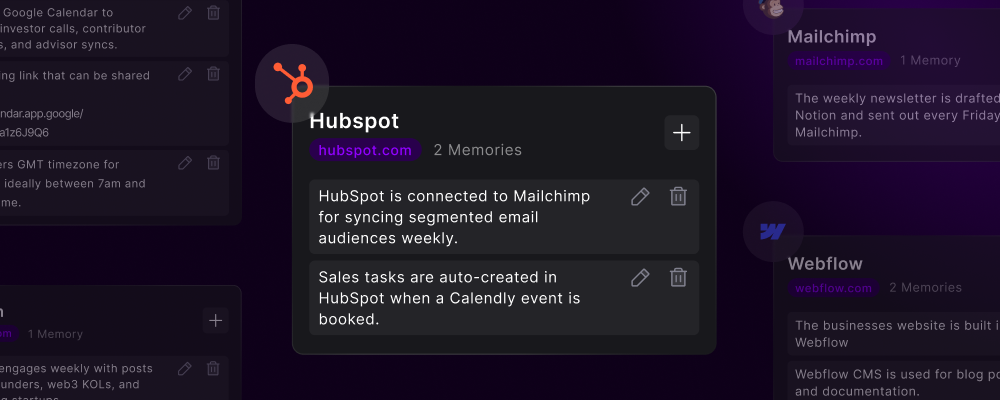
**Static Information**
Concrete facts that don't change:
* Account numbers
* API endpoints
* Company policies
* Legal requirements
* Product specifications
**Format:**
```
Platform: QuickBooks
Memory: "Company Tax ID: 12-3456789"
Type: Factual
Expires: Never
```
**How-To Knowledge**
Step-by-step instructions:
* Login sequences
* Navigation paths
* Form filling procedures
* Error handling steps
* Workflow sequences
**Format:**
```
Platform: Salesforce
Memory: "To create opportunity: Accounts → New → Opportunity → Fill required fields → Save"
Type: Procedural
Expires: On platform update
```
**If-Then Rules**
Decision-making logic:
* Business rules
* Approval thresholds
* Escalation triggers
* Exception handling
* Priority matrices
**Format:**
```
Context: Invoice Processing
Memory: "IF amount > $50,000 THEN require CFO approval"
Type: Conditional
Priority: Critical
```
**Connection Mappings**
Links between entities:
* Cross-platform IDs
* Data relationships
* Team hierarchies
* Project dependencies
* System integrations
**Format:**
```
Relationship: "Slack #project-alpha = Asana 'Project Alpha' = Drive '/Projects/Alpha'"
Type: Relational
Platforms: [Slack, Asana, Google Drive]
```
## Memory Security & Privacy
### Protecting Your Digital Intelligence
**Critical Security**: Memories often contain sensitive information. Action Model implements enterprise-grade security measures to protect your digital brain.
* AES-256 encryption for stored memories
* Separate encryption keys per organization
* Hardware security module protection
* Zero-knowledge architecture
* TLS 1.3 for all memory transfers
* Certificate pinning
* Perfect forward secrecy
* Memory isolation between agents
* Role-based memory access
* Memory compartmentalization
* Audit logging for all access
* Granular permission settings
* Choose memory storage region
* GDPR/CCPA compliant
* Right to deletion
* Data portability
## Memory Analytics
### Understanding Your Knowledge Base
**Memory Intelligence Dashboard**: Track how memories improve automation performance and identify knowledge gaps.
| Metric | Description | Optimal Range |
| ---------------------- | ------------------------------- | ------------- |
| **Memory Utilization** | How often memories are accessed | 70-90% |
| **Knowledge Coverage** | Platforms with memory data | >80% |
| **Memory Accuracy** | Successful memory applications | >95% |
| **Growth Rate** | New memories per week | 50-200 |
| **Relevance Score** | Memory-to-task matching | >85% |
## Real-World Memory Applications
### Example 1: Customer Service Excellence
**Customer Knowledge Base:**
```yaml theme={null}
General Memories:
- "VIP clients get priority response within 1 hour"
- "Always check previous tickets before responding"
- "Escalate technical issues to Tier 2"
Platform Memories:
- "Zendesk: Custom fields under 'Organization'"
- "Slack: Alert #urgent for P1 issues"
- "CRM: Customer tier in 'Account Status' field"
Workflow Memories:
- "Ticket Response: Check sentiment before replying"
- "Escalation: Include last 3 interactions"
```
**Before Memory:**
* Generic responses
* Missed VIP escalations
* Repeated questions
* 15 min average handling
**After Memory:**
* Personalized service
* 100% VIP recognition
* Context-aware responses
* 3 min average handling
### Example 2: Financial Operations
**Financial Process Knowledge:**
```yaml theme={null}
Compliance Memories:
- "All transactions >$10K require dual approval"
- "Month-end close happens on 3rd business day"
- "Expense reports need receipts for >$25"
System Memories:
- "QuickBooks: Sync with bank daily at 6 AM"
- "Excel: Financial models in 'Q:/Finance/Models'"
- "Approval workflow: Email → DocuSign → QuickBooks"
Relationship Memories:
- "Vendor ABC Inc = Account #12345 = Contact: john@abc.com"
- "Project budgets linked to Asana project IDs"
```
* **Compliance Rate**: 100%
* **Processing Speed**: 5x faster
* **Error Reduction**: 98%
* **Audit Readiness**: Always prepared
## Memory Best Practices
Build your memory foundation systematically:
1. **Company basics**: Mission, values, key information
2. **Platform access**: Login procedures, navigation
3. **Common tasks**: Frequent workflow patterns
4. **Business rules**: Policies, procedures, compliance
5. **Relationships**: Cross-platform connections
Keep memories accurate and relevant:
* Review memories monthly
* Remove outdated information
* Update platform changes
* Consolidate duplicate memories
* Archive historical memories
Use clear, searchable memory titles:
* ✅ "Salesforce: Create opportunity from lead"
* ❌ "SF opp process"
* ✅ "Client ABC Corp: Prefers formal communication"
* ❌ "ABC notes"
Classify memories by sensitivity:
* **Public**: General business information
* **Internal**: Company procedures
* **Confidential**: Client data, strategies
* **Restricted**: Passwords, API keys
## The Future of Agent Memory
### Coming Soon
Agents sharing knowledge across organizations (with permission)
Natural language memory queries: "How do we handle refunds?"
Pre-built memory sets for common industries and use cases
Automatic memory creation from documentation and wikis
## Getting Started with Memory
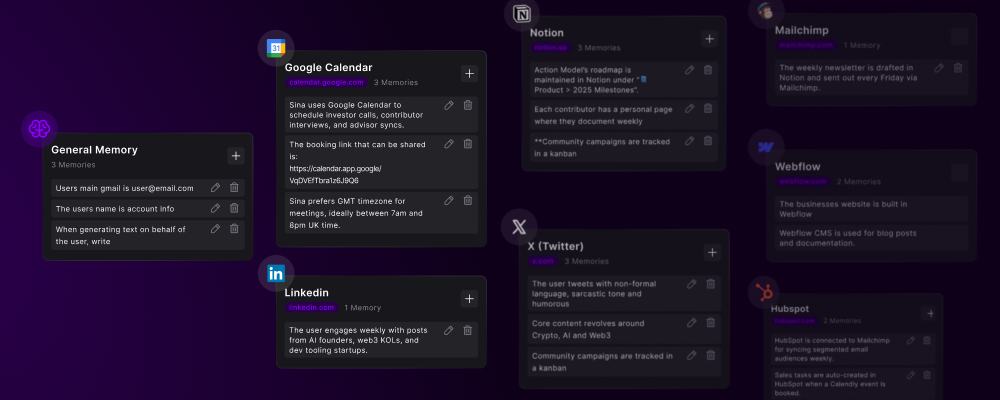
List everything your team knows but your automations don't
Organize into categories: General, Platform, Workflow, Process
Start with the most frequently needed information
Let agents observe and learn from daily operations
Use analytics to identify gaps and optimize memory usage
**The Compound Effect**: Every memory you add makes all future automations smarter. This is how you build a competitive advantage that compounds over time—your agents become uniquely intelligent about YOUR business.
Browse pre-built memory sets
Learn memory optimization
Understand memory protection
***
**Agent Memory: Where knowledge becomes permanent, intelligence becomes cumulative, and your digital workforce becomes irreplaceable.**
**Build once. Remember forever. Evolve continuously.**
 ## The Second Brain for Your Digital Workforce
 ## Memory Categories
### Structured Knowledge Organization
## Memory Categories
### Structured Knowledge Organization
 ## Memory Types and Formats
### Structured Knowledge Storage
## Memory Types and Formats
### Structured Knowledge Storage
 ## Getting Started with Memory