> ## Documentation Index
> Fetch the complete documentation index at: https://docs.actionmodel.com/llms.txt
> Use this file to discover all available pages before exploring further.
# Agents and Workflows
> Master the art of creating AI employees and automations. Build agents with specific roles and workflows that execute complex tasks in human language, no coding required.
**No Code. No APIs. Just Human Language.** While Zapier, n8n, and Make.com built tools for developers, we built Actionist for humans. If you can describe a task to a colleague, you can create a workflow.
## Actionist AI Workflow Generator
### Transform Natural Language into Visual Workflows Instantly
The Actionist AI Workflow Generator revolutionizes automation creation by converting simple text prompts into sophisticated visual workflows. Just describe what you want to automate in plain English, and watch as our AI builds a complete workflow that you can immediately use or customize.
**In about 5 minutes, receive a complete, executable workflow.** The AI asks clarifying questions and suggests improvements before generating. The more descriptive your prompt, the better the output.
### How It Works
Simply type what you want to automate in natural language:
* "Check my emails every morning and create tasks in Notion for important items"
* "Monitor competitor prices and update my Shopify store automatically"
* "Extract data from invoices and enter into QuickBooks"
No technical knowledge required - just describe your goal.
Within seconds, Actionist AI creates a complete visual workflow:
* **Smart Node Creation**: Automatically identifies all required actions and tools
* **Logical Flow Design**: Connects nodes in the optimal sequence
* **Conditional Logic**: Adds decision points and branching where needed
* **Error Handling**: Includes fallback paths and retry mechanisms
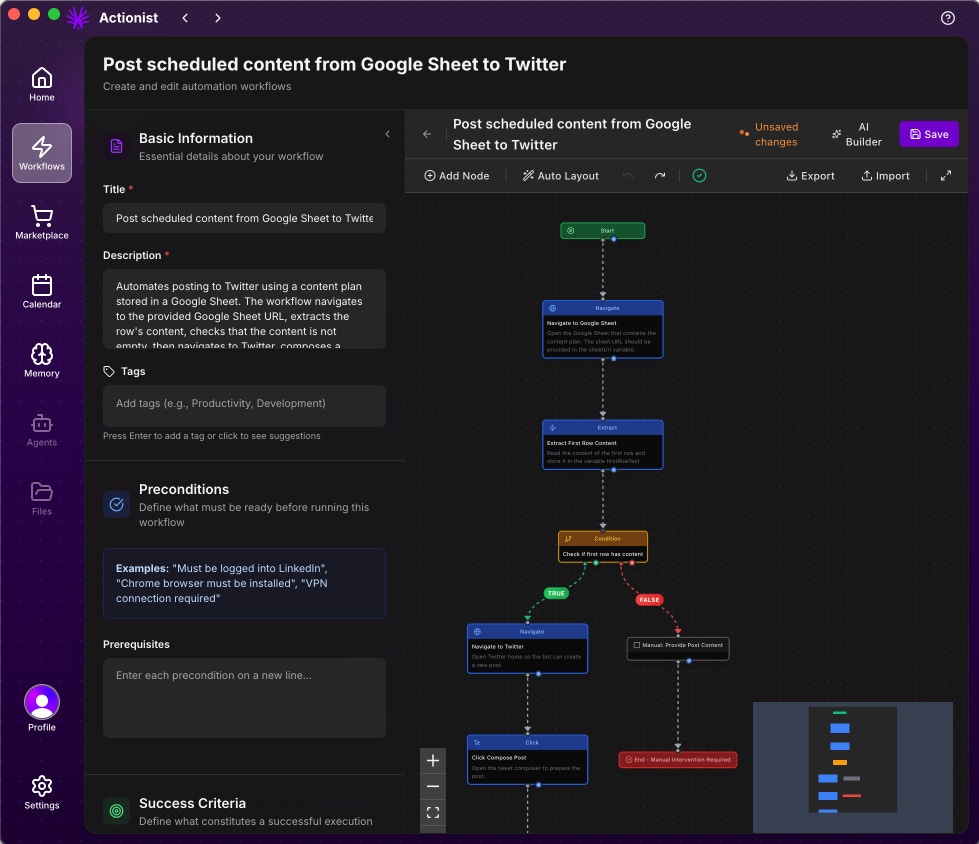
Your generated workflow appears in our intuitive visual editor (similar to n8n):
* **Drag-and-Drop Interface**: Easily rearrange nodes and connections
* **Real-Time Preview**: See data flow through your workflow
* **Node Configuration**: Click any node to adjust settings
* **Test Mode**: Run workflows step-by-step to verify behavior
Fine-tune the AI-generated workflow to your exact needs:
* **Add/Remove Nodes**: Insert additional actions or remove unnecessary steps
* **Adjust Parameters**: Modify timing, conditions, and data mappings
* **Connect More Apps**: Integrate with 1000+ applications
* **Set Schedules**: Configure when and how often workflows run
### Workflow Nodes and Tools
**Complete Automation Freedom**: Unlike traditional platforms limited to APIs, Actionist provides OS-level control combined with advanced tools and integrations, giving you unlimited automation possibilities.
#### Node Library Categories
**OS-Level Control Nodes**:
* **Click**: Click on any element on screen
* **Type Text**: Type into any input field
* **Navigate**: Go to any URL or page
* **Screenshot**: Capture screen content
* **Mouse Move**: Precise cursor control
* **Keyboard Shortcuts**: Execute any key combination
* **Drag & Drop**: Move elements visually
These nodes work on ANY application or website, not just those with APIs.
**Logic and Flow Control**:
* **If Condition**: Conditional branching based on any criteria
* **While Loop**: Repeat actions until conditions met
* **For Loop**: Iterate through lists and data
* **Merge**: Combine multiple execution paths
* **Go To**: Jump to specific workflow points
* **Wait**: Pause execution with smart conditions
* **Parallel**: Run multiple branches simultaneously
**Built-in Power Tools**:
* **Content Generation**: Uses LLM to generate, summarize, or transform content
* Read articles and create summaries
* Generate personalized messages
* Transform data formats
* Extract key information
* **Data Extraction**: Pull structured data from any source
* **Image Recognition**: Identify and interact with visual elements
* **Document Processing**: Handle PDFs, spreadsheets, documents
* **Email Handler**: Send, receive, parse emails
* **Database Operations**: Query and update databases
**External Integrations**:
* **MCP Servers**: Connect your own Model Context Protocol servers
* Custom business logic
* Proprietary tools
* Internal systems
* **REST APIs**: Direct API calls to any service
* **GraphQL**: Query complex data structures
* **Webhooks**: Trigger and receive events
* **Custom Scripts**: Run Python, JavaScript, or shell scripts
Add ANY functionality through MCP or API connections.
### Revolutionary Advantages Over Traditional Platforms
**Visual automation that controls the computer like a human. No APIs required.** Because the Workflow Engine controls the computer directly (just like a human would), you can automate ANY website or platform. No API integrations needed, no platform limitations.
**The Game Changer**: While n8n, Zapier, and Make.com are limited to API integrations, Actionist operates at the OS level—it can automate ANYTHING you can do on your computer, with zero technical complexity.
**No API? No Problem!**
Unlike competitors limited to apps with APIs, Actionist controls your entire computer—clicking, typing, and navigating any application or website. Automate legacy software, internal tools, or any GUI application.
**No JSON, No Field Mapping, No Complexity**
Forget about mapping data fields between nodes or understanding JSON structures. Actionist intelligently passes data between actions without any manual configuration. What takes hours in Zapier takes minutes here.
**Non-Technical Users Welcome**
No coding, no API keys, no webhooks to configure. If you can describe what you want, Actionist can build it. Your grandmother could create workflows that would challenge a Zapier expert.
**Best of Both Worlds**
Combine OS-level automation with API integrations and MCP servers. Start with visual automation, then add APIs for speed where available—something impossible with traditional platforms.
#### Platform Comparison
| Feature | Actionist | n8n/Zapier/Make.com |
| ------------------------------ | ------------------ | ------------------------- |
| **Automate ANY software** | ✅ Yes, anything | ❌ Only with APIs |
| **Data mapping required** | ❌ Automatic | ✅ Manual JSON mapping |
| **Technical knowledge needed** | ❌ None | ✅ Significant |
| **Legacy app support** | ✅ Full support | ❌ No support |
| **Visual debugging** | ✅ See actions live | ❌ Abstract data flow |
| **Setup complexity** | Simple prompts | API keys, webhooks, OAuth |
| **Error handling** | Automatic retries | Manual configuration |
| **Learning curve** | Minutes | Days to weeks |
### AI Workflow Generation Examples
**Prompt**: "Research trending topics in my industry and create LinkedIn posts"
**Generated Workflow** (Impossible with Zapier/n8n):
1. **Navigate** to Google News, industry blogs
2. **Click** through trending articles
3. **Content Generation**: Summarize each article using built-in LLM
4. **Content Generation**: Create LinkedIn post with insights
5. **Click** to open LinkedIn in browser
6. **Type Text** to compose post with generated content
7. **Click** to add hashtags and publish
8. **Screenshot** the published post for records
*Uses OS-level control + Content Generation—no APIs needed*
**Prompt**: "Export data from our old desktop ERP to modern cloud system"
**Generated Workflow** (Only possible with Actionist):
1. **Click** to open legacy ERP application
2. **Navigate** through desktop app menus
3. **Type Text** to enter search criteria
4. **Click** export button
5. **Wait** for file download
6. **Content Generation**: Transform data format
7. **API Call**: Upload to cloud system
8. **Email Handler**: Send completion report
*Automates software with no API—impossible for competitors*
**Prompt**: "Find LinkedIn profiles, analyze their content, and personalize outreach"
**Generated Workflow**:
1. **Navigate** to LinkedIn profile URL
2. **Click** through posts and activity
3. **Content Generation**: Analyze person's interests and expertise
4. **Content Generation**: Create personalized connection message
5. **Click** connect button
6. **Type Text** personalized message
7. **MCP Server**: Update CRM with enriched data
8. **Ask Human**: Review message before sending (optional)
*Combines visual scraping + AI analysis + human oversight*
**Prompt**: "Process contracts across multiple systems without APIs"
**Generated Workflow**:
1. **Email Handler**: Receive contract PDF
2. **Content Generation**: Extract key terms and dates
3. **Click** to open internal legal system
4. **Type Text** to create new contract entry
5. **Navigate** through approval workflow
6. **Screenshot** confirmation for audit
7. **Click** to open accounting software
8. **Type Text** payment terms
9. **Content Generation**: Create summary for stakeholders
10. **Email Handler**: Send notifications
*End-to-end automation across disconnected systems*
### Advanced Capabilities
The AI understands and implements:
* Multi-branch conditionals (IF/THEN/ELSE chains)
* Loops and iterations (process lists, repeat until conditions)
* Parallel processing (run multiple actions simultaneously)
* Error handling and retries
* Data transformations and formatting
The workflow generator improves over time:
* Learns from your editing patterns
* Suggests commonly used node combinations
* Remembers your app preferences
* Adapts to your business terminology
* Recommends optimizations based on performance
Access thousands of pre-built workflow templates:
* Industry-specific automation patterns
* Common business processes
* Community-contributed workflows
* Certified best practices
* One-click deployment
### Workflow Configuration Interface
**Professional Workflow Management**: Every workflow in Actionist comes with a comprehensive configuration interface that ensures reliability, maintainability, and scalability—without the complexity.
#### Configuration Sections
**Essential Workflow Details**:
* **Title**: Clear, descriptive name for your workflow
* **Description**: Detailed explanation of what the workflow does
* **Tags**: Categorize with tags like `automation`, `lead-generation`, `social`, etc.
* **Icon**: Visual identifier for quick recognition
Example:
* Title: "LinkedIn: Auto-connect with personalized messages"
* Description: "Search LinkedIn for posts about specific terms, analyze engagement, and send personalized connection requests to high-value prospects"
* Tags: `linkedin`, `automation`, `lead-generation`, `social`
**Preconditions & Success Criteria**:
**Preconditions**:
* Define what must be ready before execution
* Examples: "Must be logged into LinkedIn", "Chrome browser required", "VPN connection needed"
**Success Criteria**:
* What constitutes successful completion
* Examples: "All connection requests sent", "Data exported to CRM", "Report generated"
**Domain Restrictions**:
* Limit workflow to specific websites
* Ensures workflows only run where intended
* Example: `linkedin.com` only
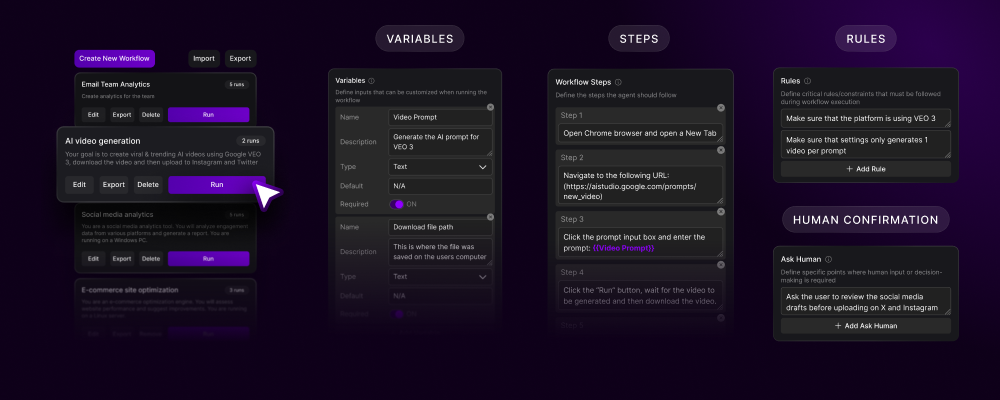
**Dynamic Input Parameters**:
Configure variables that make workflows reusable:
| Variable | Type | Description | Default |
| ----------------- | ------ | --------------------------- | --------------------- |
| `searchTerm` | Text | LinkedIn search keyword | "AI automation" |
| `minEngagements` | Number | Minimum post engagement | 50 |
| `minConnections` | Number | Minimum profile connections | 500 |
| `maxRequests` | Number | Daily request limit | 20 |
| `messageTemplate` | Text | Connection message | Personalized template |
All variables support:
* Required/optional flags
* Type validation (Text, Number, Boolean, Date, List)
* Default values
* Descriptions for clarity
**Execution Rules & Safety**:
Built-in rules ensure safe, reliable automation:
**Automatic Rules**:
* ✓ Wait for page elements before interaction
* ✓ Retry failed clicks (up to 3 times)
* ✓ Respect rate limits
* ✓ Use iteration safety limits
* ✓ Handle timeouts gracefully
**Custom Rules**:
* Add business-specific conditions
* Set execution windows
* Define failure thresholds
* Create dependency checks
**Ask Human Checkpoints**:
Define when human review is needed:
**Optional Reviews**:
* "Review generated message before sending"
* "Approve data before export"
* "Verify extraction accuracy"
**Manual Controls**:
* "Stop workflow manually at any time"
* "Pause for human decision"
* "Request approval for sensitive actions"
These ensure critical decisions remain under human control while automating everything else.
#### Configuration Best Practices
Begin with basic workflows and progressively add:
1. Variables for flexibility
2. Rules for reliability
3. Human checkpoints for safety
4. Advanced logic for complexity
Clear naming helps with:
* Finding workflows quickly
* Understanding purpose at a glance
* Sharing with team members
* Debugging issues
Configure safety limits to:
* Prevent infinite loops
* Respect platform rate limits
* Avoid account restrictions
* Maintain system performance
### Why It's Revolutionary
**The Automation Platform That Actually Works**: While competitors force you to become a developer to connect APIs, Actionist lets you automate like a human would—by simply interacting with the screen. No code, no JSON, no complexity.
#### The Fundamental Difference
**Traditional Platforms (n8n, Zapier, Make.com)**:
* ❌ Limited to \~2,000 apps with APIs
* ❌ Hours mapping JSON fields between nodes
* ❌ Break when APIs change
* ❌ Can't automate desktop software
* ❌ Require technical expertise
* ❌ Different integration for each app
* ❌ Can't handle visual elements
**Actionist Workflow Engine**:
* ✅ Automates ANYTHING on your screen
* ✅ Zero data mapping—it just flows
* ✅ Works with any software, any website
* ✅ Visual automation anyone can understand
* ✅ One approach works everywhere
* ✅ Sees and interacts like a human
* ✅ Combines OS control with APIs when needed
#### Real-World Impact
**Zapier**: 2-4 hours configuring APIs, webhooks, field mappings **Actionist**: 5 minutes describing what you want
**n8n**: Constant fixes when APIs change or fields move **Actionist**: Self-adapting to UI changes
**Make.com**: Can't touch your desktop apps or legacy systems **Actionist**: Automates your entire digital workspace
**Traditional**: Weeks learning APIs, authentication, data structures **Actionist**: If you can use a computer, you can build automations
## Recording a Workflow (Legacy)
## What Are Agents?
**Think of Agents as Digital Employees**: Each agent is a specialized AI team member with a specific role, personality, and set of skills. They work 24/7, never need breaks, and get smarter with every task they complete.
**Complete Identity**: Each Agent has its own memory system, workflow library, calendar, variables, and file access. It remembers past work and builds on previous context, becoming a fully configured AI employee with persistent knowledge.
**Responsibilities:**
* Social media management
* Content creation & scheduling
* Engagement tracking
* Campaign optimization
* Competitor analysis
**Example Personality:** Professional, creative, trend-aware
**Responsibilities:**
* Lead qualification
* CRM management
* Follow-up sequences
* Meeting scheduling
* Pipeline reporting
**Example Personality:** Persistent, friendly, results-driven
**Responsibilities:**
* Resume screening
* Interview coordination
* Onboarding automation
* Document management
* Compliance tracking
**Example Personality:** Detail-oriented, empathetic, organized
**Responsibilities:**
* Process optimization
* Data entry & migration
* Report generation
* Inventory management
* Quality assurance
**Example Personality:** Efficient, analytical, systematic
## What Are Workflows?
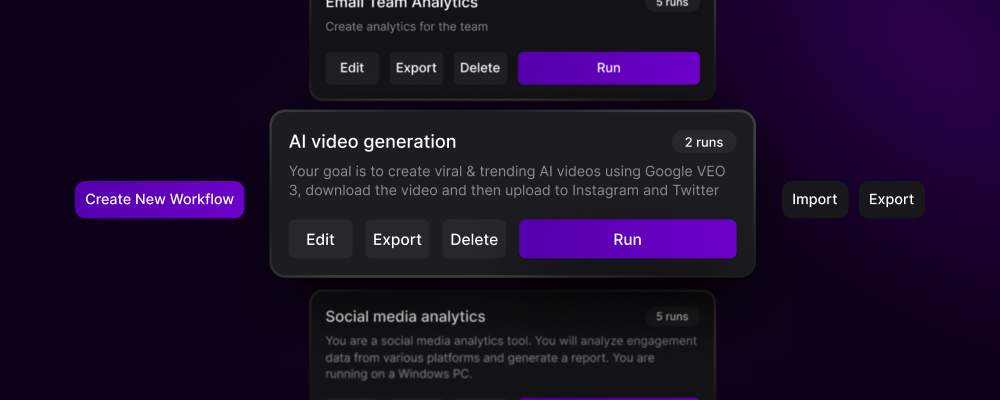
Workflows are the **individual tasks** that agents perform. Think of them as detailed instructions written in plain English that tell your agent exactly what to do.
**Workflow:** Daily LinkedIn Engagement
```
1. Open LinkedIn
2. Go to home feed
3. Find posts about "AI" or "automation"
4. Leave thoughtful comment on each post
5. Connect with other commenters
6. Log engagement in spreadsheet
```
Time to create: **2 minutes** Time saved daily: **2 hours**
**Workflow:** Complete Sales Pipeline
```
1. Import leads from CSV
2. FOR EACH lead:
- Research company on LinkedIn
- Find decision maker's email
- Generate personalized email
- IF response received:
- Schedule meeting
- Send calendar invite
- ELSE:
- Add to follow-up sequence
3. Update CRM with all activities
4. Generate daily report
```
Time to create: **10 minutes** Time saved weekly: **20 hours**
## Creating Your First Agent
Select from pre-configured templates or create custom:
Quick start with proven agent configurations
Design an agent for your specific needs
Get community-created agents instantly
Define how your agent behaves:
* **Department**: Marketing, Sales, HR, Operations, etc.
* **Communication Style**: Formal, casual, friendly, professional
* **Decision Making**: Conservative, balanced, aggressive
* **Work Hours**: 24/7 or specific schedule
Start with 2-3 core workflows:
* Choose from marketplace
* Record your own
* Build with visual editor
Provide essential knowledge:
* Login credentials (encrypted)
* Platform preferences
* Company information
* Brand guidelines
## Building Workflows: Three Methods
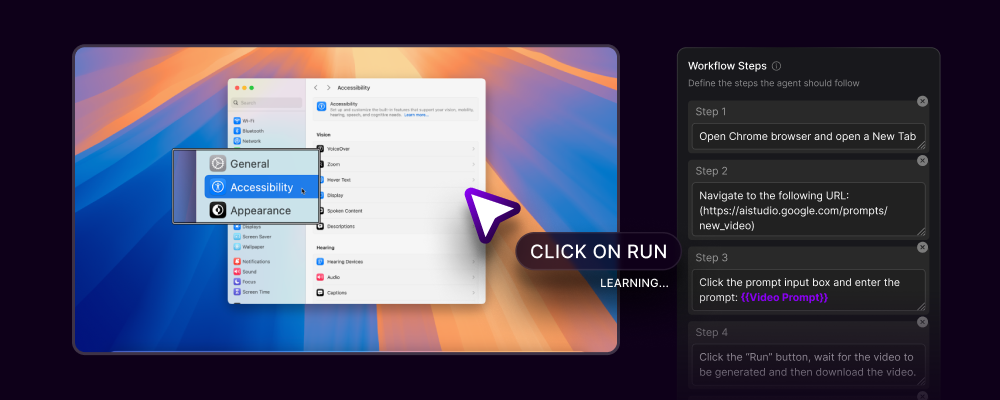
### Method 1: Screen Recording (Easiest)
Click the record button and Actionist starts watching
Perform the task normally while Actionist learns
Mark fields that change each time
Highlight decision points
Set confirmation checkpoints
Actionist converts your actions into readable steps
### Method 2: Visual Workflow Builder
Drag and drop these nodes to build complex logic:
| Node Type | Purpose | Example Use |
| ------------ | ------------------- | ------------------------- |
| **Action** | Perform GUI actions | Click button, type text |
| **Decision** | Branching logic | IF price > \$100 THEN... |
| **Loop** | Repeat actions | Process all items in list |
| **Wait** | Pause execution | Wait for page load |
| **Chain** | Link workflows | Start another workflow |
| **Human** | Get approval | Confirm before sending |
| **Error** | Handle failures | Retry or alert on error |
* Draw connections between nodes
* Set data flow direction
* Configure pass-through variables
* Add conditional paths
* Run in test mode
* Step through node by node
* Inspect variables at each step
* Fix issues before deploying
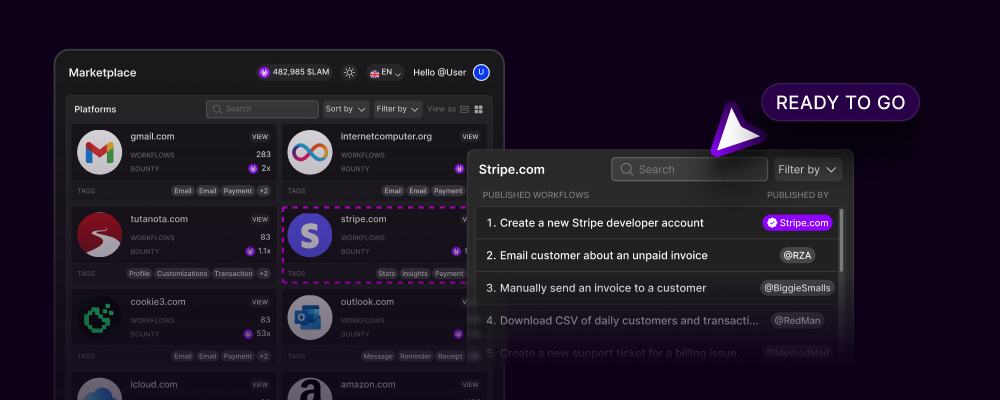
### Method 3: Import from Marketplace
**Instant Automation**: Access thousands of pre-built workflows. Customize variables to match your needs and start automating in seconds.
## Workflow Configuration Deep Dive
### Dynamic Inputs for Flexibility
Variables make workflows reusable and powerful:
```yaml Basic Variables theme={null}
email_subject: "Weekly Report"
recipient_list: "team@company.com"
report_date: "{today}"
priority_level: "high"
```
```yaml Advanced Variables theme={null}
customer_segments: ["enterprise", "SMB", "startup"]
price_threshold: 1000
discount_percentage: 15
approval_required: true
escalation_email: "manager@company.com"
```
**Variable Types:**
* **Text**: Names, descriptions, messages
* **Numbers**: Quantities, prices, thresholds
* **Dates**: Deadlines, schedules, ranges
* **Lists**: Multiple items, categories
* **Booleans**: Yes/no decisions
* **Files**: Paths, attachments, uploads
### Human-Readable Instructions
Write steps like you're explaining to a colleague:
```text Simple Steps theme={null}
1. Open Gmail
2. Click "Compose"
3. Enter recipient email
4. Type subject line
5. Write message body
6. Click "Send"
```
```text Complex Steps with Logic theme={null}
1. Open CRM dashboard
2. Navigate to "Leads" section
3. Filter by "Last 7 days"
4. FOR EACH lead in list:
a. Check lead score
b. IF score > 80:
- Mark as "Hot Lead"
- Assign to senior sales
c. ELSE IF score > 50:
- Mark as "Warm Lead"
- Add to nurture campaign
d. ELSE:
- Mark as "Cold Lead"
- Schedule follow-up in 30 days
5. Export results to CSV
6. Email report to sales manager
```
### Constraints and Conditions
Rules ensure workflows behave correctly:
* Only process during business hours (9 AM - 6 PM)
* Skip weekends and holidays
* Respect rate limits (max 100 emails/hour)
* Stay within budget constraints
* Verify data before processing
* Check for duplicates
* Validate email formats
* Ensure required fields are filled
* Get approval for amounts > \$1000
* Confirm before bulk operations
* Create backups before modifications
* Log all critical actions
### When to Require Confirmation
Strategic points for human oversight:
**Critical Actions Always Need Confirmation:**
* Financial transactions
* Mass communications (>100 recipients)
* Data deletion
* Contract agreements
* Hiring decisions
**How It Works:**
1. Workflow reaches checkpoint
2. Agent pauses execution
3. Sends notification (App, Telegram, WhatsApp, Email)
4. Waits for human response
5. Continues based on input
**Autopilot Mode:** Can bypass confirmations for trusted workflows (use carefully!)
## Advanced Features
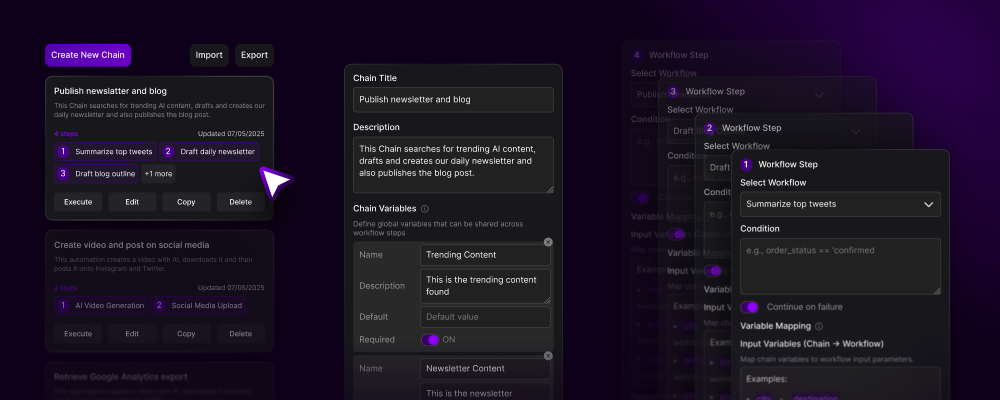
### Chains: Multi-Workflow Orchestration
Link workflows together for complex automation:
**Workflow 1:** Scrape LinkedIn → **Output:** Lead list CSV
**Workflow 2:** Process CSV → **Output:** Enriched database
**Workflow 3:** Send emails → **Output:** Campaign metrics
**Workflow 4:** Monitor responses → **Output:** Meeting scheduled
### Intelligent Features
Process lists intelligently with conditional exits and error handling
Run multiple workflows simultaneously for maximum efficiency
Let the LAM make context-aware decisions during execution
Automatic retry logic and graceful failure handling
Track execution time, success rates, and optimization opportunities
Roll back to previous versions if needed
## Real-World Examples
### See Actionist in Action
Explore detailed demonstrations of real workflows with video examples, step-by-step breakdowns, and ROI calculations.
**Watch Demo**: Professional network engagement
* 2-3 hours saved daily
* 1,700-2,900% ROI
* Includes full video walkthrough
**Watch Demo**: AI content generation & distribution
* 4-5 hours saved daily
* 3,100-4,700% ROI
* Multi-platform publishing
**Watch Demo**: Complete hiring automation
* 40+ hours saved per role
* 3,600-5,200% ROI
* From screening to scheduling
**Watch Demo**: Lead management & campaigns
* 6-8 hours saved daily
* 3,100-5,000% ROI
* Full pipeline automation
**More Examples Available**: Visit our [complete demos page](/actionist/app-demos-and-examples) to explore additional industry-specific workflows, cost comparisons, and implementation strategies.
## Best Practices
1. Begin with one simple workflow
2. Test thoroughly before expanding
3. Add complexity gradually
4. Chain workflows once stable
5. Share successful workflows in marketplace
**Good Names:**
* `LinkedIn_Daily_Engagement_AI_Topics`
* `Email_Campaign_Tech_Startups_Q4`
* `Invoice_Processing_Accounts_Payable`
**Bad Names:**
* `Workflow_1`
* `Test`
* `LinkedIn_Thing`
Before deploying any workflow:
* Run in test mode first
* Try different input variations
* Test error scenarios
* Verify output quality
* Check performance metrics
* Store credentials in encrypted memory
* Use approval checkpoints for sensitive actions
* Implement rate limiting
* Log all critical operations
* Regular security audits
## Get Started Now
Get the desktop app and start building
Find pre-built workflows for instant automation
See real examples across industries
**Remember**: Every workflow you create strengthens the community-owned alternative to Big Tech's automation monopoly. You're not just saving time—you're building the future of work.
***
**Transform your computer into an autonomous workforce.**
**No code. No limits. Complete ownership.**
 ### How It Works
 ## Building Workflows: Three Methods
### Method 1: Screen Recording (Easiest)
## Building Workflows: Three Methods
### Method 1: Screen Recording (Easiest)
 ## Advanced Features
### Chains: Multi-Workflow Orchestration
Link workflows together for complex automation:
## Advanced Features
### Chains: Multi-Workflow Orchestration
Link workflows together for complex automation: