

Browser Extension Overview - Earn While You Browse
Your Data, Your Rewards: Unlike Big Tech that takes your data to train their AI without compensation, Action Model rewards you for your time. Install the extension, browse normally, and earn tokens that represent your ownership in the AI future.
You Are Always in Control
Extension Only Runs When You Enable It: The Action Model browser extension is designed with your consent at its core. The extension will never start recording or operating without you manually enabling Background Training or ActionFi mode. This is a fundamental principle outlined in our Google Extension Terms and Conditions, ensuring you always have complete control over when and how the extension operates.
Manual Activation Required
The extension remains inactive until you explicitly enable Background Training or ActionFi. No automatic data collection, ever.
Your Choice, Your Timing
Start and stop training whenever you want. The extension respects your browsing preferences completely.
The Power of Community Training
Building the LAM Together
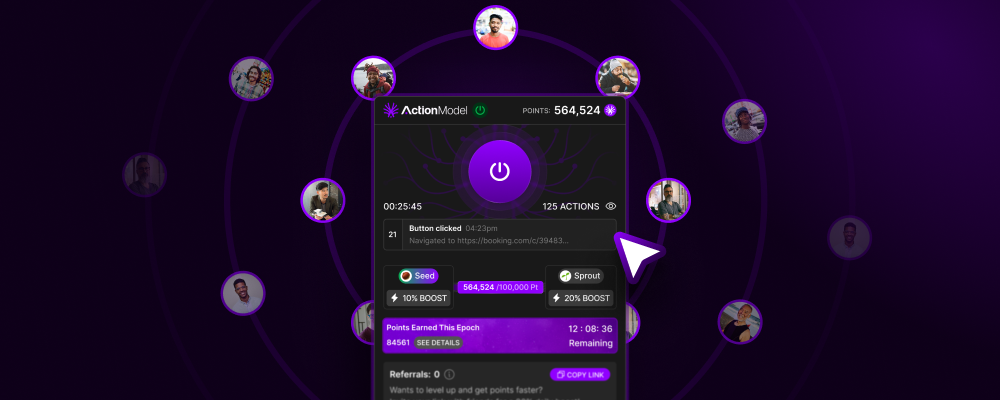
60 Second Setup
Install, connect, and start earning in under a minute. No technical knowledge required.
Passive Income
Earn tokens automatically while browsing. Your normal internet usage becomes valuable training data.
Privacy First
You control what’s shared. Sensitive sites are automatically excluded. Your data, your rules.
How It Works
The Journey from Click to Intelligence
1
Install Extension
Add to Chrome, Firefox, or Edge in one click. Available on all major browsers.
2
Connect Account
Link your Action Model account to track rewards and manage settings.
3
Browse Normally
Use the internet as you always do. The extension works silently in the background.
4
Actions Recorded
Every click, type, and navigation is captured and anonymized.
5
Earn Tokens
Receive $LAM tokens based on the quality and quantity of your contributions.
6
Build Ownership
Your tokens represent ownership in the LAM and voting rights in the DAO.
Training Modes
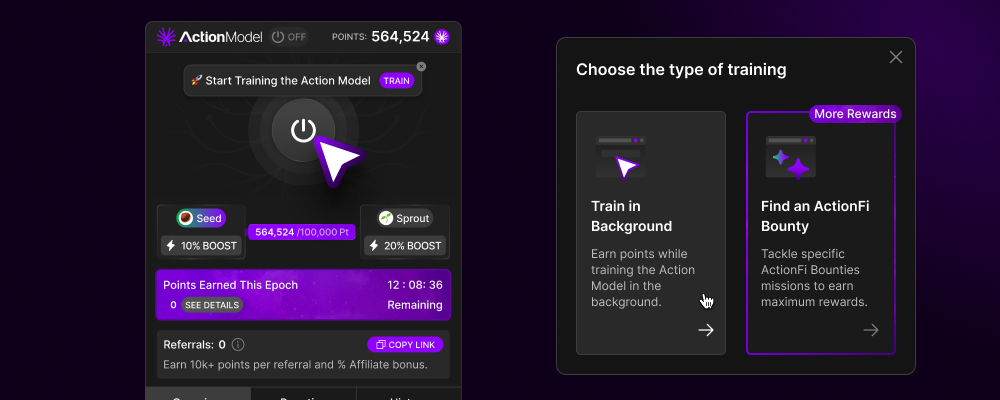
Choose Your Level of Engagement
- Background Training
- ActionFi Bounties
Set It and Forget ItBackground training is the simplest way to earn tokens. Once you enable it, the extension runs quietly in the background, recording your natural browsing patterns without any intervention required. We designed background training to keep running continuously once enabled, so you can truly set it and forget it.Note: We are aware of a bug where the extension may stop running after a browser update. This can end your background training session without notification. We recommend periodically checking the extension icon to confirm training is active.What’s Collected: Page navigation sequences, click patterns, form interactions, time spent on tasks, general workflow patternsRewards: Base rate of 10 points per minute, multipliers for valuable platforms, automatic daily payouts, zero effort requiredPerfect For: All users, privacy-conscious contributors, passive income seekers, first-time trainers
What Data Is Collected
Comprehensive Yet Respectful
Transparency First: We collect only what’s necessary to train the LAM effectively. Every piece of data serves a purpose in teaching AI how to navigate the digital world.
DOM Elements
DOM Elements
What: HTML structure, element IDs, classes, and attributes Why: Identifies interactive elements and their relationships Example: Button locations, form fields, navigation menus
Screenshots
Screenshots
What: Visual captures of page states (anonymized) Why: Provides visual context for actions Example: Layout understanding, visual element recognition
User Actions
User Actions
What: Clicks, scrolls, hovers, and keyboard inputs Why: Maps action sequences to outcomes Example: How users complete specific tasks
Timing Data
Timing Data
What: Time between actions and page load times Why: Creates realistic action pacing Example: Natural typing speed, thinking pauses
Network Requests
Network Requests
What: API calls and responses (metadata only) Why: Understands dynamic content loading Example: AJAX updates, form submissions
Training History and Session Management
Track Every Contribution
All of your training sessions are logged and accessible through the Training History tab on your dashboard. Here you can see your total earnings, training sessions, time contributed, and actions recorded.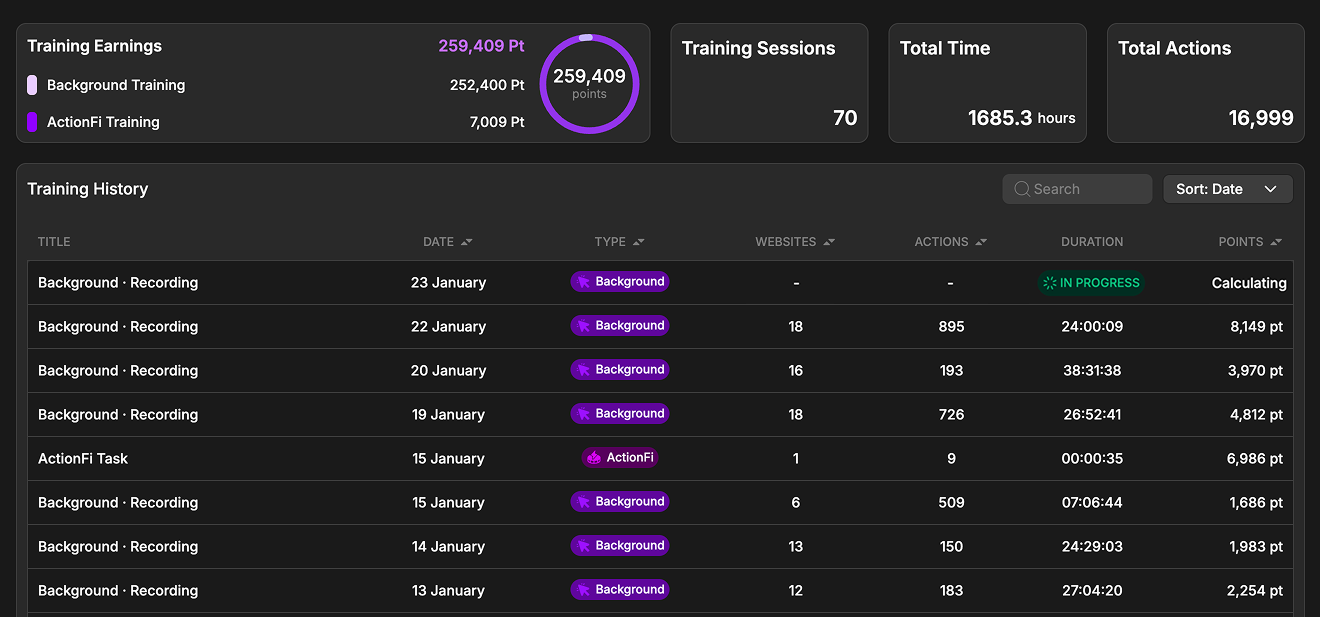
Training History Dashboard - Track your earnings and sessions
Automatic Session Batching
For convenience and easy tracking, the extension automatically splits background training sessions into approximately 24-hour batches. The exact timing may vary slightly depending on when your device is active, but this batching makes it simple to review your daily contributions and earnings.24-Hour Batches
Background training sessions are automatically organized into daily chunks for easy tracking and review.
Session Types
Your history shows both Background Training and ActionFi sessions, each clearly labeled with type, duration, and points earned.
Session Details and Data Transparency
Click into any training session to view detailed information about that specific run. From here you can see:- Points Earned: Total rewards for this session
- Actions Recorded: Number of interactions captured
- Duration: How long the session ran
- Websites Visited: Number of unique sites in this session
- Action Branch: A detailed breakdown of every recorded action
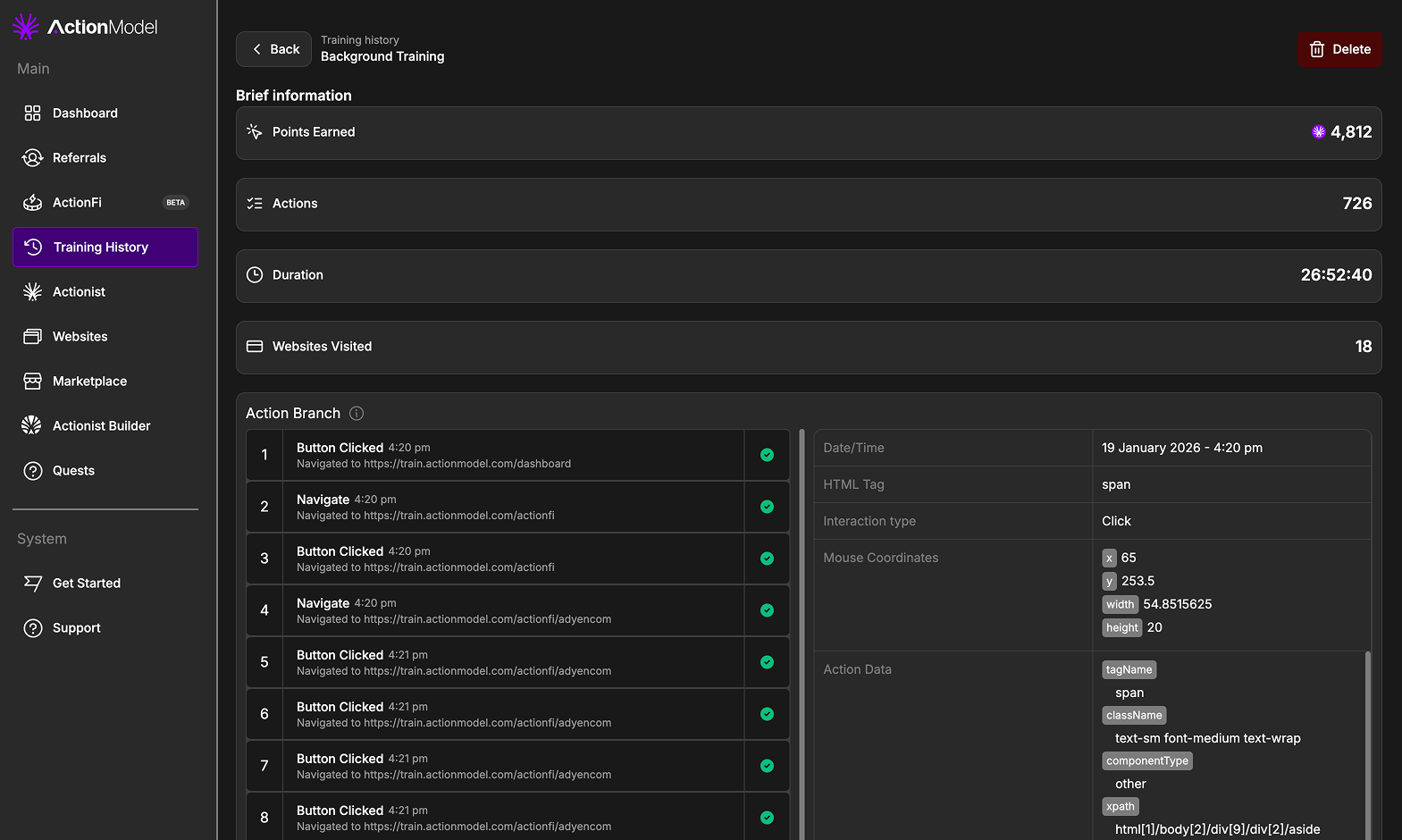
Session Breakdown - View detailed data for any training session
Delete Your Data Anytime
Every session includes a Delete button that allows you to permanently remove that training data from our systems. Note that deleting a session will forfeit any rewards associated with it, as the data will no longer contribute to LAM training.Website Block List
Control Which Sites Contribute Data
The Block List gives you complete control over which websites participate in background training. Any website added to your block list will be excluded from data collection.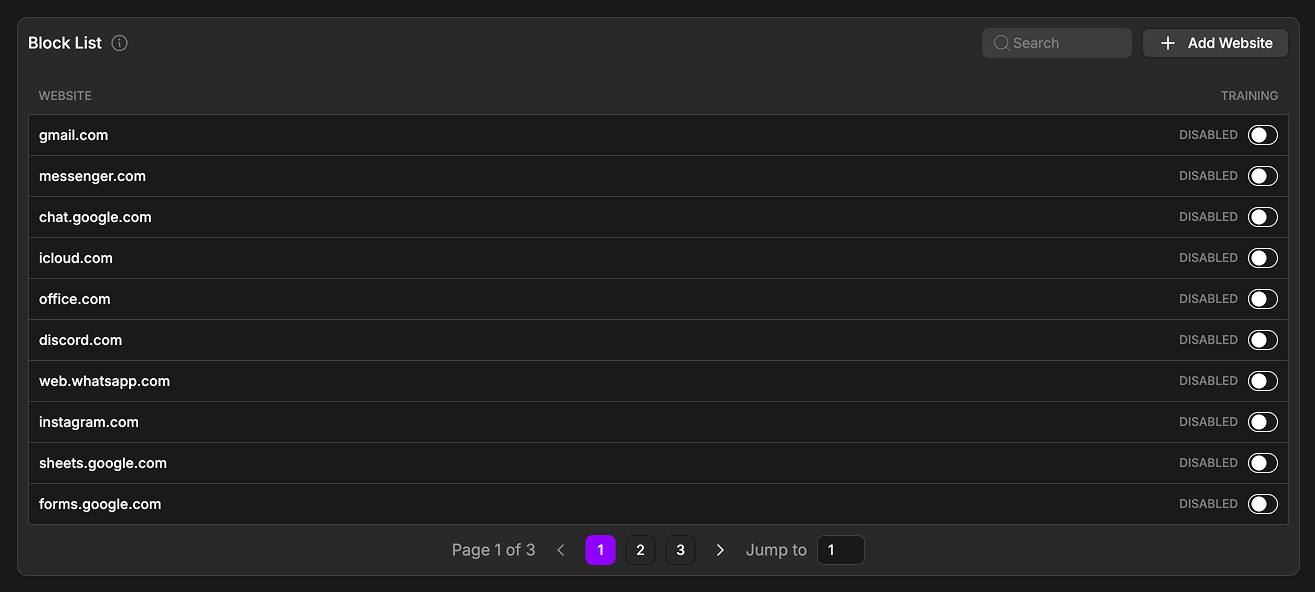
Block List - Manage which websites are excluded from training
Default Exclusions: We’ve pre-populated the block list with dozens of websites that should not be included in training by default. This includes messaging platforms (Gmail, Discord, WhatsApp), social media (Instagram, Messenger), productivity tools (Google Sheets, Forms), and cloud storage (iCloud, Office). You can remove any of these or add additional sites at any time.
Managing Your Block List
Points and Post-Processing
Understanding Reward Timing
Processing Delays: Action Model undertakes post-processing on all training data, which can result in delays before points appear in your account. In some cases, the final reward may be adjusted after post-processing is complete based on data quality and validation.
Dashboard Statistics
The dashboard statistics page operates on a delayed update schedule to reduce server load:- Some statistics update hourly
- Other statistics update daily
- Points calculations may take time to finalize after a session ends
Platform Bounties
Earn More on High-Value Platforms
Strategic Training: Not all platforms are equal. Training on ActionFi partner platforms can earn you up to 50x more than regular browsing.
Current Top Bounties
View All ActionFi Bounties
Check real-time ActionFi bounty multipliers and maximize your earnings
Privacy and Security Features
Your Data, Your Control
Automatic Exclusions
Never Recorded by Default: Banking websites, healthcare portals, government sites, password managers, messaging platforms, incognito/private mode
Custom Block Lists
You Decide: Manage your block list anytime, add any site to exclude it, remove defaults if you choose, pause recording anytime, delete data on request
Reward System
How You Earn
Token Economics: Your browsing time contributes valuable training data to the LAM. Your rewards reflect the value you’re creating for the ecosystem.
Earning Calculation
- Base Rewards
- Multipliers
- Special Rewards
Standard Earnings
- Background training: 10 points/minute
- Quality bonus: Up to 2x
- Consistency bonus: 1.5x for daily use
Installation Guide
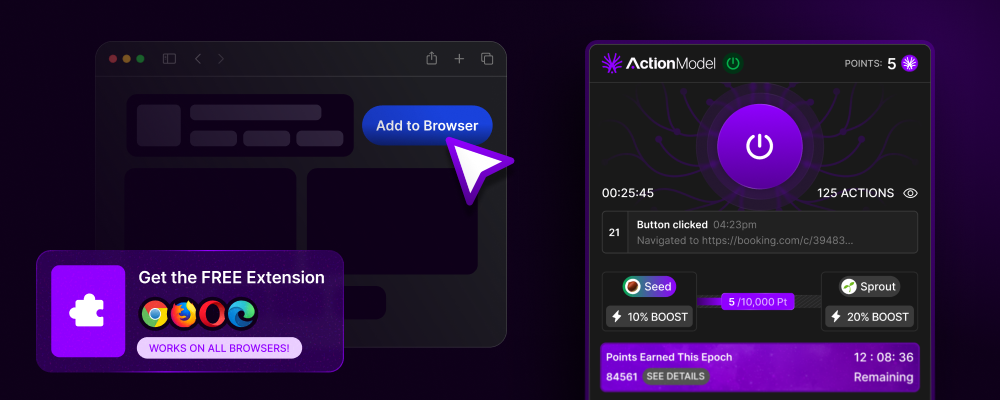
Get Started in 60 Seconds
1
Visit Extension Store
Go to Chrome Web Store, Firefox Add-ons, or Edge Add-ons
2
Search Action Model
Look for “Action Model - Train & Earn” by Action Model Foundation
3
Click Add to Browser
One-click installation, no configuration needed
4
Create/Connect Account
Sign up or log in to your Action Model account
5
Choose Training Mode
Select Passive (recommended) or Active mode
6
Start Earning
That’s it! You’re now training the LAM and earning tokens
Dashboard Features
Track Your Impact
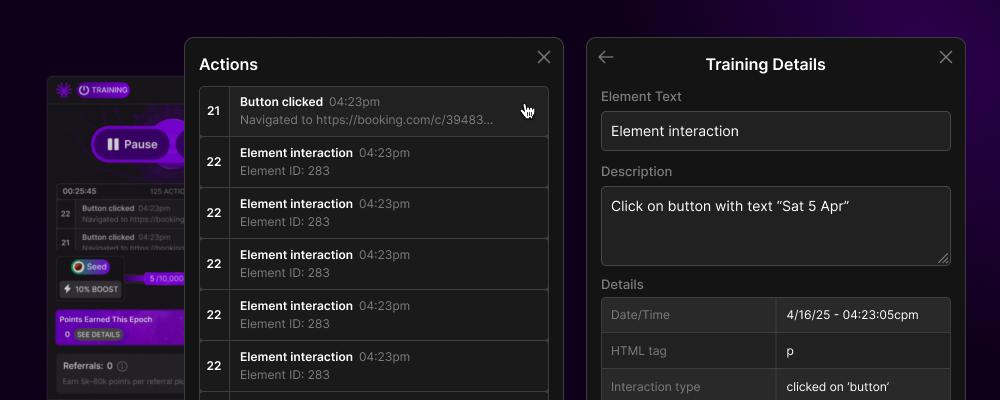
Key Metrics
- Time Trained: Total time contributed to the LAM
- Points Earned: Current balance and history
- Active Multipliers: Current bonuses applied
- Platform Coverage: Your training diversity
- Referral Network: Track your invited users
- Leaderboard Rank: Compare with community
Advanced Features
For Power Users
Workflow Recording
Workflow Recording
Record specific task sequences that become reusable workflows in the marketplace. Earn royalties when others use your workflows.
Variable Labeling
Variable Labeling
Mark dynamic elements in workflows (dates, names, amounts) to create flexible, reusable automations.
Quality Validation
Quality Validation
Review and validate other users’ workflows to earn additional rewards and improve overall data quality.
Custom Rules
Custom Rules
Define specific rules and conditions for your workflows, making them more intelligent and adaptable.
Community Impact
What We’re Building Together
Global Community
Active trainers worldwide
Growing Coverage
Platforms mapped daily
Earn Rewards
For every contribution
Browser Compatibility
Works Everywhere You Do
FAQs
Does it slow down my browsing?
Does it slow down my browsing?
No. The extension uses minimal resources (<1% CPU, <50MB RAM) and operates asynchronously to never impact your browsing experience.
Can I use it at work?
Can I use it at work?
Yes, but check your company’s policies. Many businesses encourage it as they benefit from the improved automation capabilities.
What about my passwords and personal data?
What about my passwords and personal data?
Never captured. The extension automatically excludes password fields, payment information, and personal data entry.
Can I pause it temporarily?
Can I pause it temporarily?
Yes. Click the extension icon to pause/resume anytime. You can also set schedules for automatic pausing.
Start Training Now
Install Extension
Add to your browser and start earning immediately
View Dashboard
Track your training progress and rewards
Join Community
Connect with trainers worldwide
Your time trains the future. Your contribution earns you ownership. Install. Browse. Earn. Own.